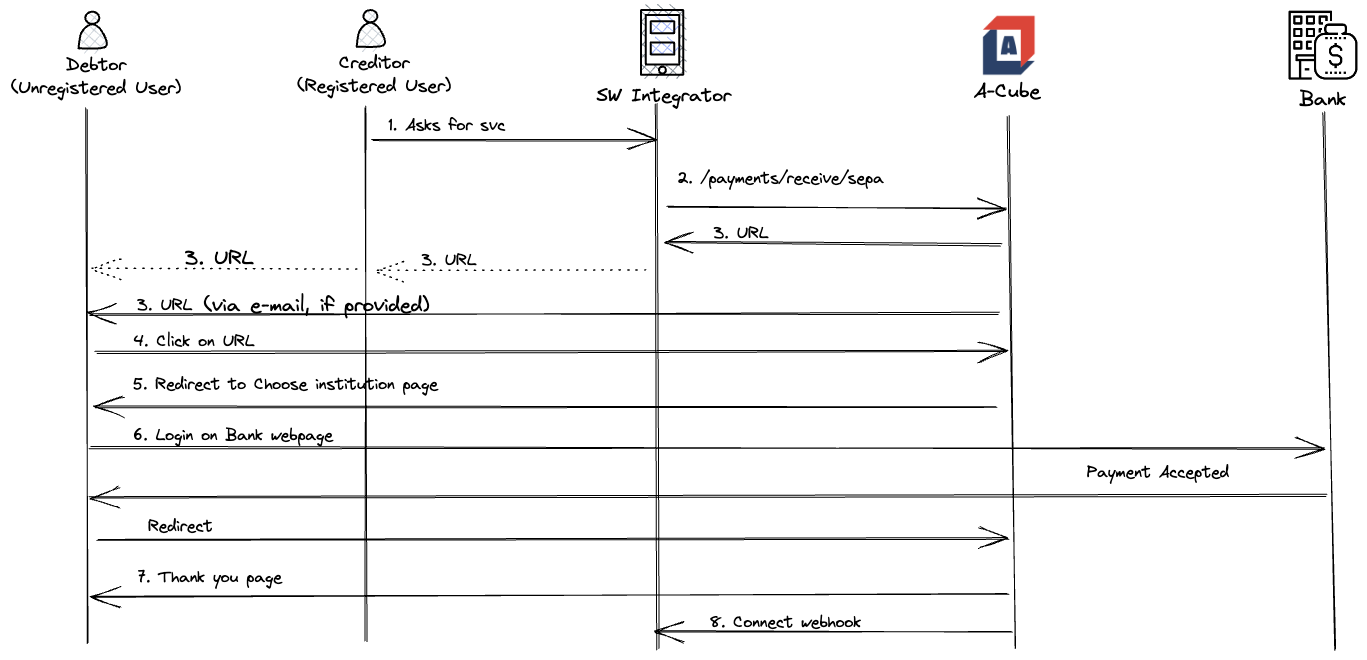
The Request to Pay process
Here are the steps that an end user, who already registered the consent for a financial account, has to follow in order to require and receive payment.
Please note that the Financial Institution holding the account that will receive the payment has to support the payment system requested for the payment,
otherwise the request is rejected with a 422 Unprocessable entity http error.
- The Registered End User asks to start the request to pay process.
- The Software Integrator sends a POST to Start Request to Pay
- A-Cube API responds with a URL
- The Registered End user sends this URL to their debtor, who has not to be registered on A-Cube.
- The Debtor clicking on the URL will be redirected to a page where to choose the desired Financial Institution from which to fulfill the payment.
- The process will continue on the website of the Financial Institution.
- If process is successful, the Debtor will be redirected to the optional
returnUrl, when it has been specified in the request; otherwise a page summarizing the details of the payment just made will be displayed. - At this point A-Cube will call the payment Webhook with a success payload.