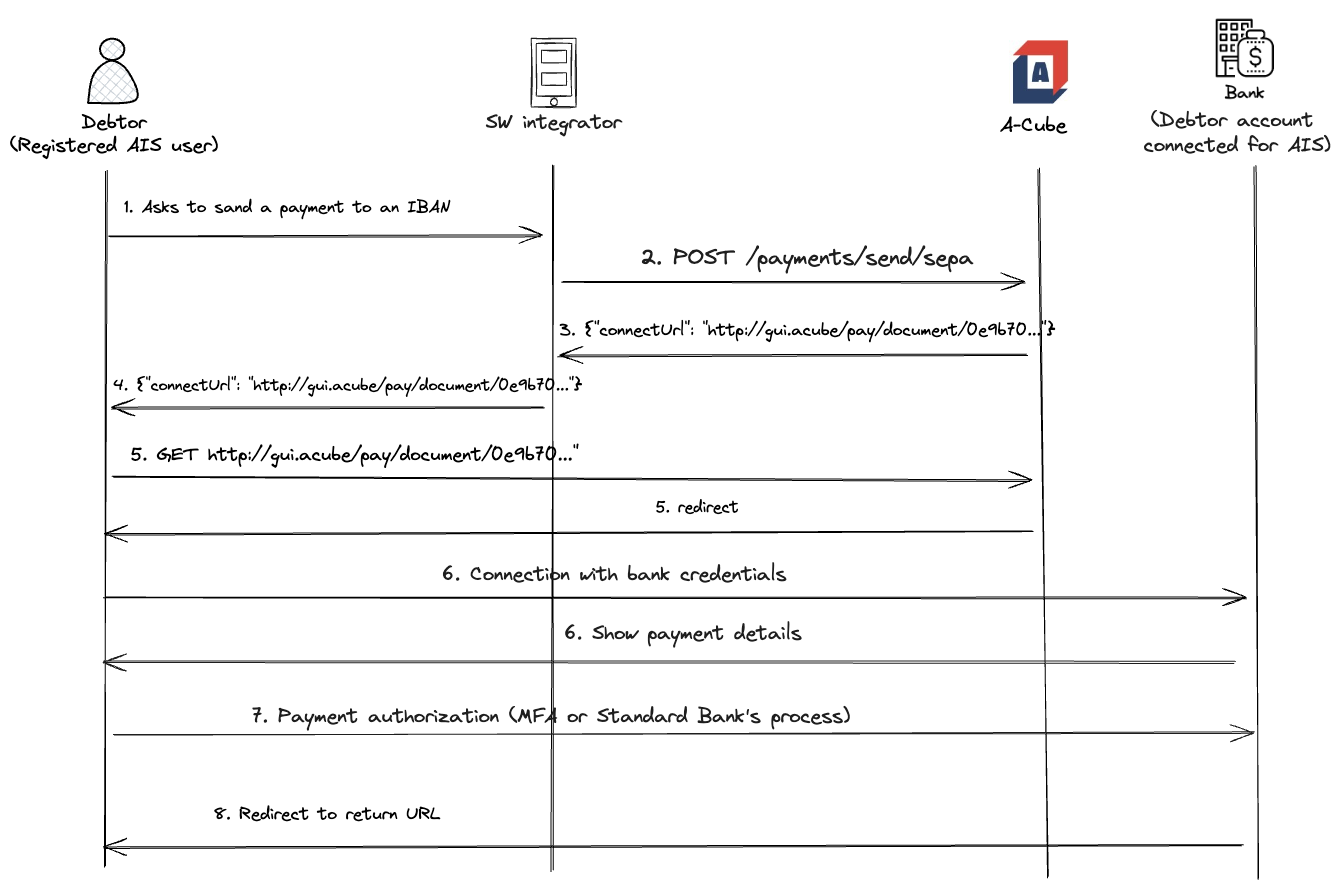
Outbound Payment process
Here are the steps that an end user, who already registered the consent for a financial account, has to follow in order to send a payment from one of the connected accounts.
Please note that the Financial Institution holding the account has to support the payment system requested for the payment,
otherwise the request is rejected with a 422 Unprocessable entity http error.
- The Registered End User asks to start the outbound payment process.
- The Software Integrator sends a POST to Start a payment
- A-Cube API responds with a URL
- The software integrator sends this URL to the Registered End user.
- The Registered End user clicking on the URL will be redirected to the desired Financial Institution from which to fulfill the payment.
- The process will continue on the website of the Financial Institution.
- If process is successful, the Registered End user will be redirected to the optional
returnUrl, when it has been specified in the request; otherwise a page summarizing the details of the payment just made will be displayed. - At this point A-Cube will call the payment Webhook with a success payload.