Frequently Asked Questions
Is an additional subscription required to access the payment collection services on the Open Banking product?
Yes. For further information, please contact our sales department by opening a ticket of type "sales/commerciale".
After successfully completing the connection process for a financial institution, are the accounts automatically enabled for API access?
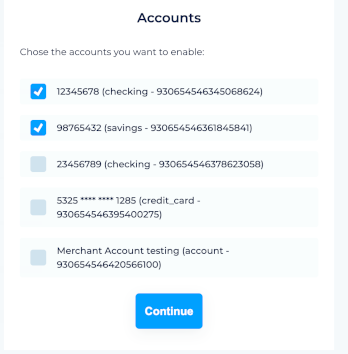
No. Following the connection process, you must explicitly enable each account through the A-Cube Developer Portal, either by ticking the relevant checkboxes or using the dedicated API.
I am a reseller, can operations be white label? Does the confirmation email contain references to A-Cube Open Banking?
It is possible to disable emails sent by A-Cube by changing the relevant flag within the BRC. From that point on, you can manage notifications independently by configuring your own webhooks based on the events and sending the notifications to the customer yourself.
What are the most frequent problems that can arise in the Open Banking area, both for data access and for payment initiation?
Data access:
- Consent expiry (SCA): Under PSD2 regulations, user consent has a limited duration (usually 180 days).
- Lack of data standardization: Each bank may interpret fields differently. For example, a transaction description or the merchant category may appear "dirty" or truncated.
- Data refresh frequency: Banks usually limit the number of daily API calls, so data is not synchronized in real time but in batches (the average is 4 updates per day, but as noted above this varies from bank to bank).
- When downloading transactions via API, only 30 transactions per page are returned by default; in this case the page parameter must be specified in order to use pagination.
- Also regarding transactions, SaltEdge may send transactions flagged as duplicates. Such transactions should be discarded directly by your system; in the A-Cube dashboard we provide a filter to hide them. For payment initiation:
- Following a connect call, consent is requested from the user and will last 180 days (a shorter duration than 180 days can, however, be set). The consent requested is valid only for the connection_id from which it was sent, so if the user requests a new connect for the same entity, consent will have to be provided again and the previous one will have expired. It is good practice to perform a connect only for new connections, whereas to use connections that have already been established you must use the reconnect call.
- When importing transactions via the API, only 30 transactions per page will be displayed by default; in this case, you must specify the ‘page’ parameter to enable pagination.
- Still on the subject of transactions, SaltEdge may send transactions marked as duplicates. These transactions should be discarded directly by your system; the A-Cube dashboard provides a filter to hide such transactions.
How does the data update work? Is there a waiting period? Does the update take place at fixed intervals?
We always retrieve the most up-to-date information possible from our partner; however, the frequency of updates depends on how often the bank provides this information to our partner. Not all banks update their information with the same frequency. The minimum frequency is once a day per bank.
Is there an API to force a data refresh?
There is no endpoint to force a data refresh.
Which banks can I connect to?
The list of banks is available at https://www.saltedge.com/products/account_information/coverage/it
Which Italian banks are covered by the service?
Via the API, you can find a list of the Italian banks covered by the service by querying the endpoint: https://docs.acubeapi.com/documentation/api/openbanking/get-provider-collection
Which foreign banks support bank transfer payments on our Open Banking platform?
All banks in the SEPA network.
What procedure can be followed to ensure that, once a payment by bank transfer has been authorised, the customer does not cancel it via their bank?
Unless it is an instant bank transfer, the payment is only secure once you see it listed in your Open Banking transactions. In the case of standard SEPA bank transfers, the ‘success’ webhook merely indicates that the transfer has been authorised; it does not cover the scenario described, in which a customer contacts their bank to cancel it.
How long are the payment links valid for? Can their validity period be customised?
At present, payment links do not expire, so their validity period cannot be customised.
I’m linking my bank account but I can’t select the branch.
The link you need to select is for the bank itself, not for branch XYZ; in the selection window, you will never see individual branches listed as options, only the banks themselves. You should therefore select the name of the bank. If you are unsure which name to choose, you should check with your bank.
Is it also possible to link credit/debit card accounts?
To link credit or debit cards, you do not need to follow a different procedure from the one already used for bank accounts: the card is detected automatically when you link the institution to which it is associated, following the same linking procedure you have already used for your accounts.
If the card is linked to an account at a bank you’ve already linked, it should already appear amongst your accounts.
If, however, the card is issued by an institution other than your bank (for example, a specific card network), you’ll need to link it by repeating the linking procedure and selecting that institution from the available list.
There is therefore no separate ‘link card’ button or section: simply start the linking process again and choose the correct institution from the list.
Does the PayPal account you have selected not support SEPA transfers?
No, a PayPal account does not support SEPA transfers. To carry out a test and successfully complete the payment, use the ‘Fake OAuth Bank with client keys’ bank.
Select: ‘Fake OAuth Bank with Client Keys’ and the specified account. 12345678 (checking - 17893...)
I’m getting an account returned without an IBAN when I call the API https://ob-sandbox.api.acubeapi.com/business-registry/:id/accounts. Is this possible?
Yes, it is possible for an account not to have an IBAN; it depends on the information returned by the bank. This is typical for debit accounts, UK accounts, e-wallets, loans, etc.
If a user authorises the same bank multiple times, they receive the same account details each time but with different IDs (uuid and accountId). Is there a way to uniquely identify an account that does not have an IBAN following multiple authorisations?
Each new authorisation request creates a new bank connection, with new accounts. As indicated in the field documentation, uuid and accountId are not stable identifiers; they change with each new authorisation.
Rather than reconciling accounts, we recommend preventing duplicates from being generated. Before requesting a new authorisation, check whether accounts for that bank already exist for that Business Registry, by comparing them with the available data (providerName, connectionId).
If the connection already exists, use the /reconnect API to renew the connection; this ensures that the uuid and accountId are retained.
What information is each bank required to provide, and what is optional, along with the relevant documentation?
The documentation can be found at the following link: https://docs.acubeapi.com/documentation/api/openbanking/get-transaction-item
The bank may only opt out of providing the information listed in the ‘extra’ section.
In the sandbox environment, for both personal and business accounts, we have noticed that when accessing accounts via the API, we are unable to view data older than one month. Is there a way to view this data? In the production environment, can we retrieve data older than one month?
The information displayed when connecting to an account, whether in the sandbox or in production, is always the same. The endpoint for the list of providers https://docs.acubeapi.com/documentation/api/openbanking/get-provider-collection also provides the ‘maxFetchDays’ parameter, which specifies how far back in time the transaction data will go.
Is it possible to view the details of a bank transfer that is the result of several transfers? In other words, if we have a single transfer of 1,000 euros, which is the sum of three separate transfers of 200, 300 and 500, can we see the three separate transactions in the report, rather than just the single transfer?
It depends on the bank. Please check in the test environment or sandbox by connecting a live account.
Isn’t there some sort of ID or reference number for an invoice that I can then use to search my bank statements using a filter?
No.
Can you confirm that failures may arise from the refresh of previous consent accounts? How should they be deactivated, is there an endpoint, or can this only be done via the dashboard?
Let’s consider this hypothetical scenario: there is a Business Registry showing 8 accounts with ‘enabled=true’ for the same IBAN, accumulated from previous consent renewals; 6 of the previous consents have ‘consentExpiresAt’ set to 01/01/2000; the 2 that are actually active have consents with a current date (e.g. January 2029).
You repeatedly receive a ‘connect.failure’ error (“Consent is invalid. Please renew authorisation”) at what appear to be scheduled intervals.
Yes, it is correct to receive this message, as a check is carried out on the registered and existing accounts.
Yes, it is possible to deactivate them; see https://docs.acubeapi.com/documentation/api/openbanking/delete-account-item
When is the ‘reconnect’ webhook sent?
The ‘reconnect’ webhook is sent only when consent expires, not upon successful reconnection.
Upon successful reconnection, the ‘connect’ webhook is sent.
Are revoked consensus accounts expected to remain enabled=true with an expiry date of 01/01/2000?
Yes, this is the standard behaviour.
Transactions for company 0xxxxxxxxxx have been on hold for the past 7 days, even though consent has been successfully reactivated. What should I check?
Check the consent status and, if it is active, reconnect the account.
An account looks connected and its consent is still valid, but transactions have stopped updating. How can I find out?
The financial institution may stop providing data even before the consent expires, for example because of an error during the automatic refresh or because the user revoked access from the bank's app.
Configure a webhook for the connection event: you will be notified when a refresh fails, together with the status of the connection and the URL to reconnect it.
A connection with status active and error class FetchingStopped needs to be reconnected by the user to start updating again.
How does renewal/reconnection work? Does the user need to carry it out via your portal or via the API? Is there a procedure that needs to be initiated BEFORE the expiry date to avoid any interruptions?
To reconnect, call the API: https://docs.acubeapi.com/documentation/api/openbanking/reconnect-account-item
You can also reconnect via the dashboard. You can do this at any time, but we recommend doing so before the expiry date.
Is it mandatory to set up webhooks?
Webhooks can be really useful to receive notifications in an async way, but they are not mandatory in order to use Open Banking APIs.
I've got the token form the authentication API, but I still can't use Open Banking API
Remember that the token is a bearer one. So the authentication header should look like this Authorization: bearer JWT_TOKEN_HERE
I can't download more than 30 records using the API
A common mistake is to forget that our APIs are paginated, returning 30 records by default.
Even if I passed the connection process I can't read data from my financial accounts
Please verify to have checked the GDPR consent and to have explicitly enabled each account you would like to handle.
I tried to create a new Business Registry, but I get an error telling that the entity already exists
You can't use the same email for different Business Registries.