Receipt lifecycle
new
-
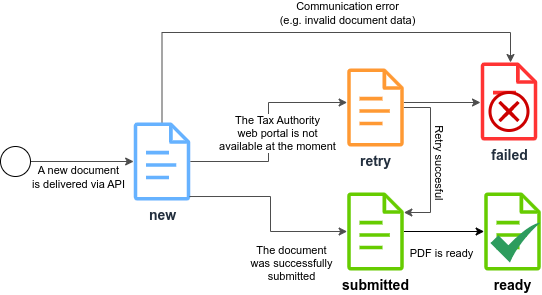
The document is sent via REST API specifying all the necessary data in a JSON document. The A-Cube platform will manage the life cycle of the document ensuring delivery if the provided data is correct.
-
A-Cube Platform will perform a pre-validation before sending the document to the Tax Authority web portal. In case of errors you will synchronously receive a
400response with the error details. -
Once the JSON document is received via API, the A-Cube platform marks the receipt as
newand it is signed using theECDSA_SHA_512digest algorithm to guarantee the integrity of the data. The client immediately receives a unique identifier for the document in response.
submitted and ready
-
At the same time, a process will start in the background managing communication with the Tax Authority web portal. After successfully communicating the document, it will be marked as
submitted. -
Right after the document is submitted, A-Cube will generate the PDF version of the receipt. Once this job is done, the receipt will be set as
readyfor download and a message will be sent via webhook to your software systems for thereceiptevent.
retry and failed
-
If there is a communication problem with the Tax Authority web portal, the document will be marked as
retry, placed in a waiting queue, and re-sent after a predetermined interval. Each new attempt is notified via webhook with thereceipt-retryevent. Once the sending is completed, the document will be set tosubmitted. -
The causes of failure to communicate may include incorrect or expired credentials or the unavailability of the Revenue Agency portal. There is no maximum number of attempts: the document is re-sent until 11:58 PM (Italian time) on the day it was acquired. If it is not possible to send the document successfully by then, the document will be marked as
failed. -
If the Tax Authority web portal rejects the message due to a data error, the document is not re-sent and is marked as
failedimmediately.
In both cases, immediate communication will be sent via webhook to your software systems with the receipt-error event.
For a list of possible error codes, see the receipt-error event.