Legal Entities
A Legal Entity is a company with a NIP established in Poland. Each client with an account on the A-Cube Platform can manage multiple legal entities.
Register a Legal Entity
To register a new Legal Entity, you need to send a properly formatted JSON payload to the Create a Legal Entity endpoint, or you can do it directly through the "Legal Entity" section in the dashboard.
An example of a payload is the following:
{
    "nip": "1234567890",
    "name": "MojaFirma",
    "addressLine1": "ul. Fakturowa",
    "addressLine2": "20",
    "postcode": "00-001",
    "city": "Warszawa",
    "countryIso2": "PL",
    "email": "ceo@mojadomena.pl"
}
Starting onboarding for a Legal Entity
Within the Dashboard, a new entry will appear with an INIT button. Once you click on this button, we will display a URL, which enables initiation of the onboarding process for the respective legal entity.
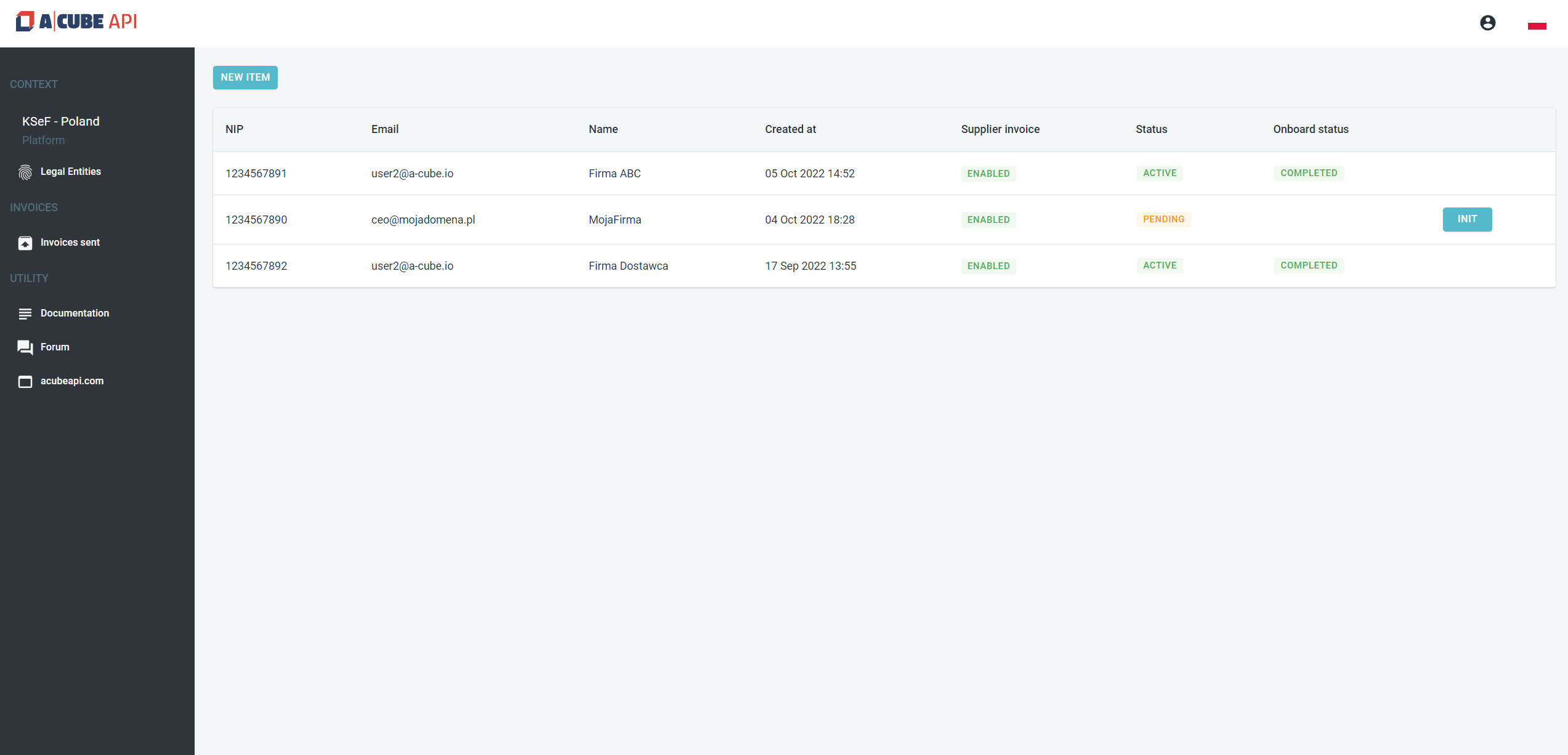
Every Legal Entity has a Status property that describes its level of permission in the system.
| Status | Description |
|---|---|
| pending | the Legal Entity has been added to the A-Cube Platform. |
| active | the Legal Entity has been successfully onboarded and obtained a certificate from the KSeF. |
| blocked | the Legal Entity has been blocked due to an incorrect onboarding process or it has been blocked manually by the administrator. |