Onboard legal entity
What's a Legal Entity
Legal Entities represent the companies on whose behalf you wish to activate and manage electronic invoicing and compliance procedures in France.
To legally exchange live documents under the French mandate, every company must officially declare its designated Accredited Platform (PA-R) in the government's central directory (Annuaire central). The primary purpose of the A-Cube onboarding process is to establish this official assignment (or "claim") on the Annuaire, enabling us to route inbound and outbound invoices on behalf of your customers.
As a strict regulatory safeguard to protect access to the central registry, the French government requires a formal identity verification process via KYC/KYB (Know Your Customer / Know Your Business).
The A-Cube Advantage: Instead of dealing with cumbersome offline paperwork, A-Cube embeds a fully digital, friction-free KYC/KYB workflow directly into the onboarding sequence. We handle the structural validation, gather the necessary proofs, and programmatically update the Annuaire as soon as verification succeeds, dramatically reducing your operational overhead.The workflow is divided into 2 straightforward technical steps:
- Resource Creation: Initialize the entity within the A-Cube context using a valid SIREN number. A-Cube creates the resource and prepares the administrative sandbox.
- Onboarding Initialization: Triggering the onboarding session deploys our digital verification pipeline and returns a secure, dedicated portal URL designed to collect the regulatory KYC/KYB evidence from your end user.
Step 1: Legal Entity Creation within A-Cube
The initial registration of the company is performed by providing its core national identifier (SIREN).
Create a Legal Entity Resource
POST /legal-entities
// Request Payload
{
  "siren": "123456789"
}
// Response Payload
{
  "uuid": "019ea760-dad8-70b9-9b23-f60ff4004509",
  "status": "TO_BE_ONBOARDED",
  "displayName": "FABIOR",
  "countryCode": "FR",
  "siren": "324730001",
  "siret": null,
  "networkIdentifiers": [
    {
      "type": "siren",
      "value": "0225:324730001",
      "validFrom": "2026-01-01"
    },
    {
      "type": "suffix",
      "value": "0225:324730001_freetext",
      "validFrom": "2026-01-01"
    }
  ],
  "contactEmail": null,
  "createdAt": "2026-06-08T13:16:43+00:00",
  "updatedAt": null
}
Step 2: Official Annuaire Assignment & KYC Link Generation
This step initiates the official assignment process on the central directory (Annuaire central). Because establishing A-Cube as the authorized PA requires validated proof of identity, this endpoint generates the gateway to the digital KYC experience.
Initialize Onboarding
POST /legal-entities/{uuid}/onboard
No input payload is required for this endpoint.
Response:
{
  "onboardingUrl": "https://fr.api.acubeapi.com/onboarding/4f7a9112-9c3b-48fa-8672-111222333aaa"
}
Note for the Partner: The URL returned in the onboardingUrl field must be displayed within your application UI or forwarded directly to the end customer's legal representative.
Once the customer securely completes the digital KYC/KYB flow through that link, A-Cube takes care of the rest: the company's status will automatically transition to ONBOARDED and we will publish the official PA assignment directly to the French government's Annuaire. This transition will trigger an asynchronous legal_entity.onboarding webhook event to notify your systems instantly.
Automated Status Tracking via Webhooks You do not need to constantly poll the A-Cube API to check if your customer has completed the verification. The entire lifecycle of the KYC processing and subsequent Annuaire enrollment is fully asynchronous.
A-Cube will automatically push real-time updates directly to your configured endpoints using Webhooks.
Whenever the status changes (e.g., when the user completes the flow, if a document is rejected by our compliance team, or when the final approval is granted), your system will instantly receive a legal_entity.onboarding event payload:
{
  "eventId": "019ea765-da8a-70af-a037-b068ad1ff1ce",
  "eventType": "legal_entity.onboarding",
  "status": "ONBOARDING_IN_PROGRESS",
  "legalEntityUuid": "019ea760-dad8-70b9-9b23-f60ff4004509"
}
Best Practice: Use these webhook notifications to automatically update the account status within your own internal CRM or ERP dashboard, providing your users with immediate visual feedback on their onboarding progress.
Completing the Digital KYC/KYB Experience
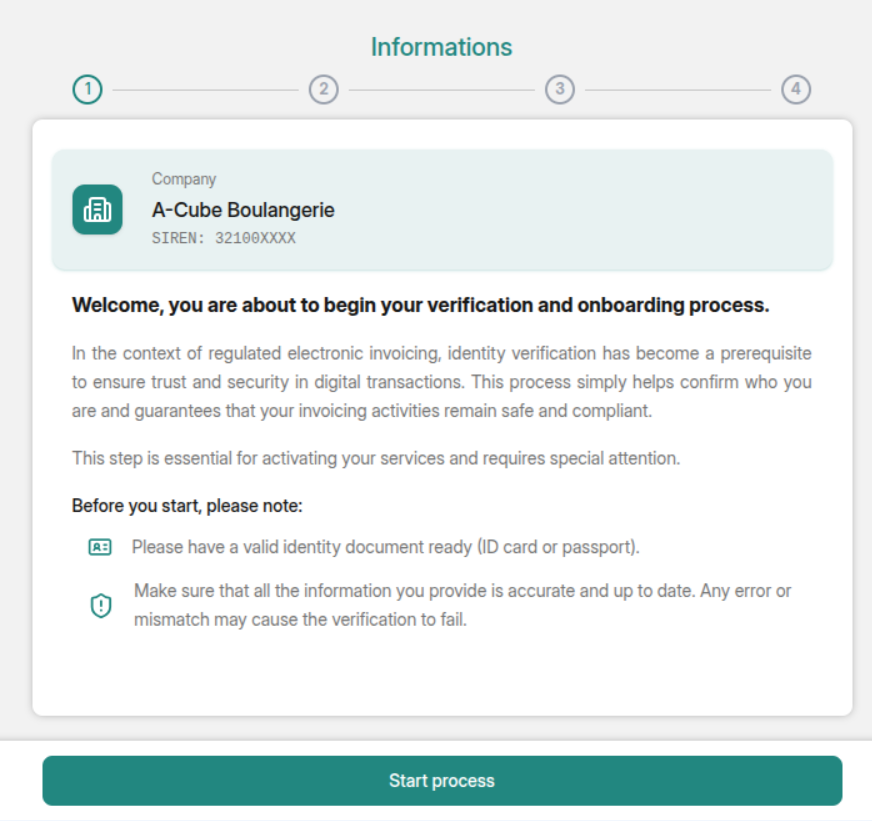
To ensure a smooth user experience, the enrollmentUrl directs your customer to our secure, step-by-step verification wizard.
Please Note: Once the user successfully completes the digital KYC/KYB flow, it may take a short time for the onboarding process to fully finalize. A-Cube must securely process the verified identity data, publish the official platform assignment to the French central directory (Annuaire central), and propagate the routing details to the Peppol SMP network.