Onboarding Legal Entity
Onboarding process
As a strict regulatory safeguard to protect access to the central registry, the UAE requires a formal verification of the taxpayer's identity before an Accredited Service Provider can act on its behalf.
For this reason, the taxpayer starts the verification of its legal entity, called onboarding, from EmaraTax, the digital tax platform of the Federal Tax Authority.
The whole onboarding happens in two places:
- In EmaraTax, the taxpayer selects A-Cube as its Accredited Service Provider.
- On the A-Cube onboarding page, the taxpayer confirms its details. A-Cube then creates the legal entity, registers it on the Peppol network and synchronizes it with the central registry.
When the flow is complete, the legal entity is ready to send and receive documents. You do not need to call the API: the A-Cube onboarding page runs the onboarding calls for you. For all use cases where you need to drive the onboarding through the API, complete the initial steps in EmaraTax and then continue with Onboarding via API.
There are three lifecycle operations. Each one starts in EmaraTax and continues on the A-Cube onboarding page:
| Action | Starts when the taxpayer | Documented in |
|---|---|---|
LINK | selects A-Cube as its Accredited Service Provider. | this page |
REVERIFY | confirms the association again, to refresh its legal data. | Updating Legal Entity |
DELINK | removes A-Cube as its Accredited Service Provider. | Updating Legal Entity |
Onboarding steps (LINK operation)
LINK onboards a new taxpayer, from EmaraTax to an active legal entity.
The EmaraTax and landing page steps follow the FTA guide UAE E-invoicing End-User Process for Onboarding, Reverify and Offboarding.
In EmaraTax
These are the steps the taxpayer follows in the EmaraTax portal before reaching the A-Cube onboarding page.
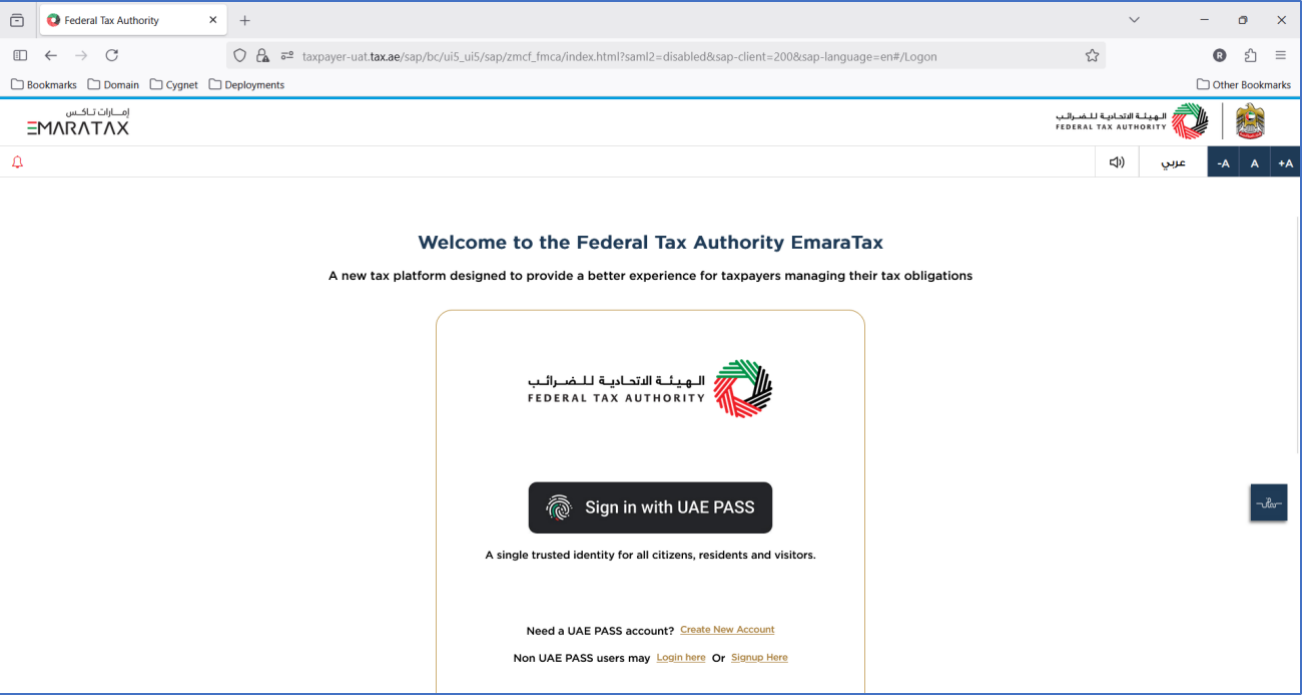
Sign in
The taxpayer signs in to EmaraTax, with UAE PASS or with the EmaraTax credentials for non-UAE PASS users. After a successful login, EmaraTax lists the taxable persons associated with the account.
Select the taxable person
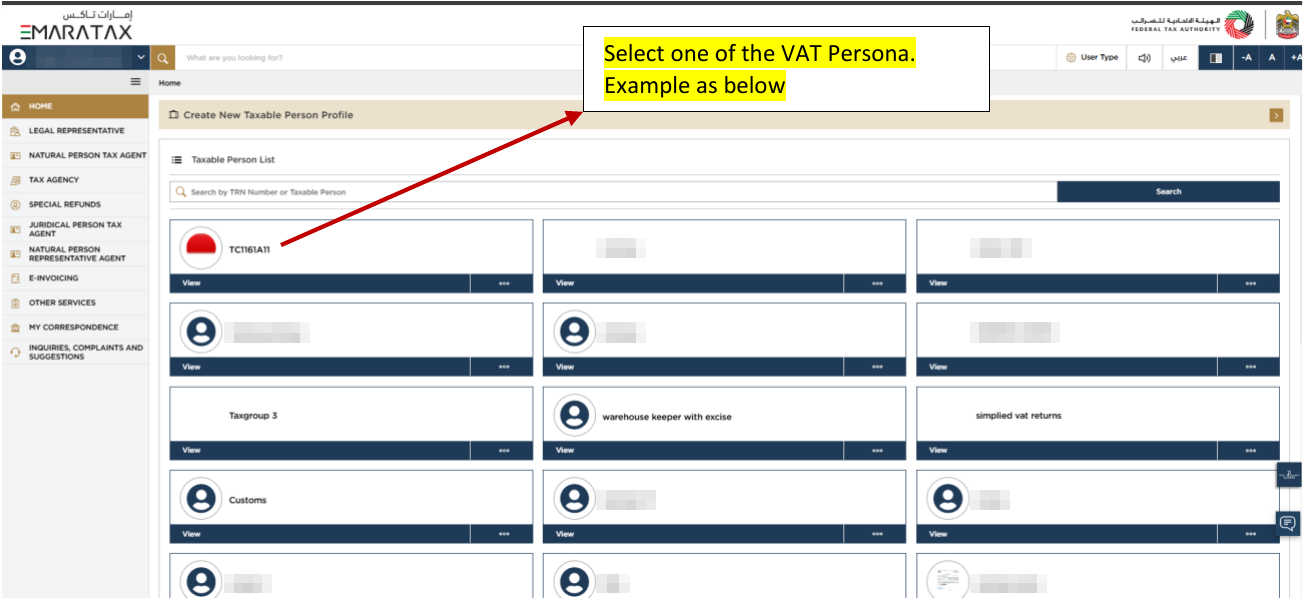
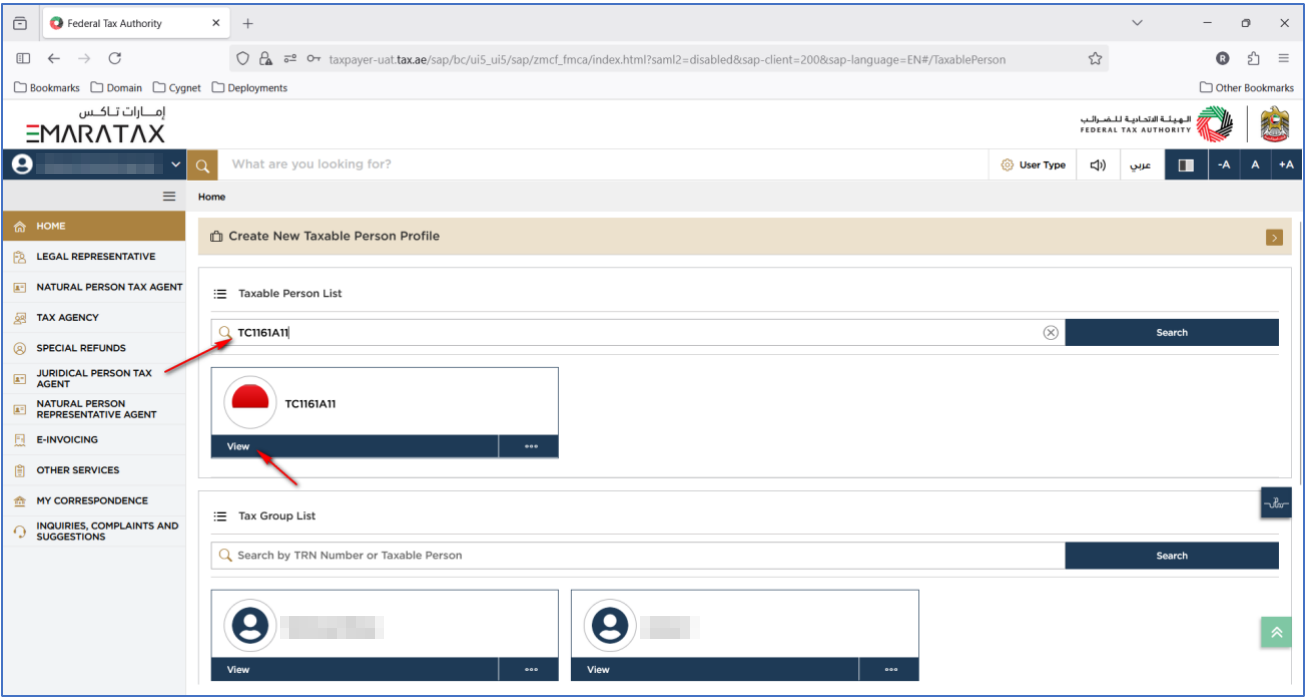
In the Taxable Person List, the taxpayer finds the entity to onboard and clicks View on its card.
When the account manages many entities, the taxpayer can type the entity name or its TRN in the search bar.
Open the e-invoicing section
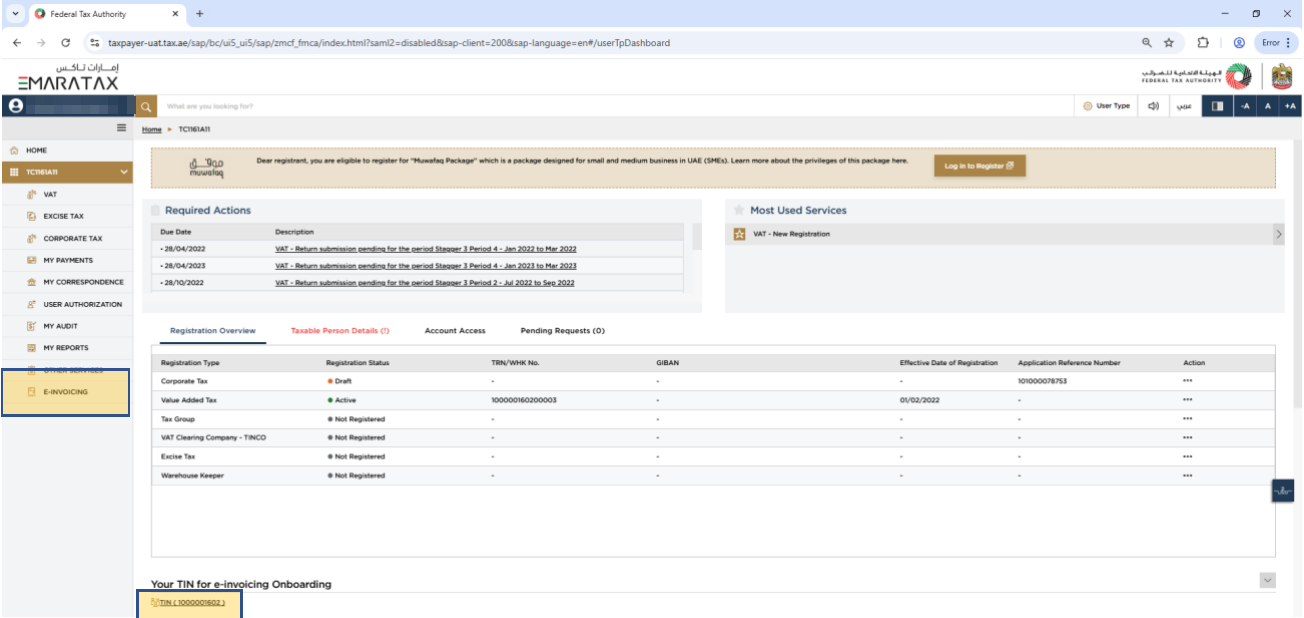
On the entity dashboard, the taxpayer clicks E-Invoicing in the left menu, or the TIN link under Your TIN for e-invoicing Onboarding.
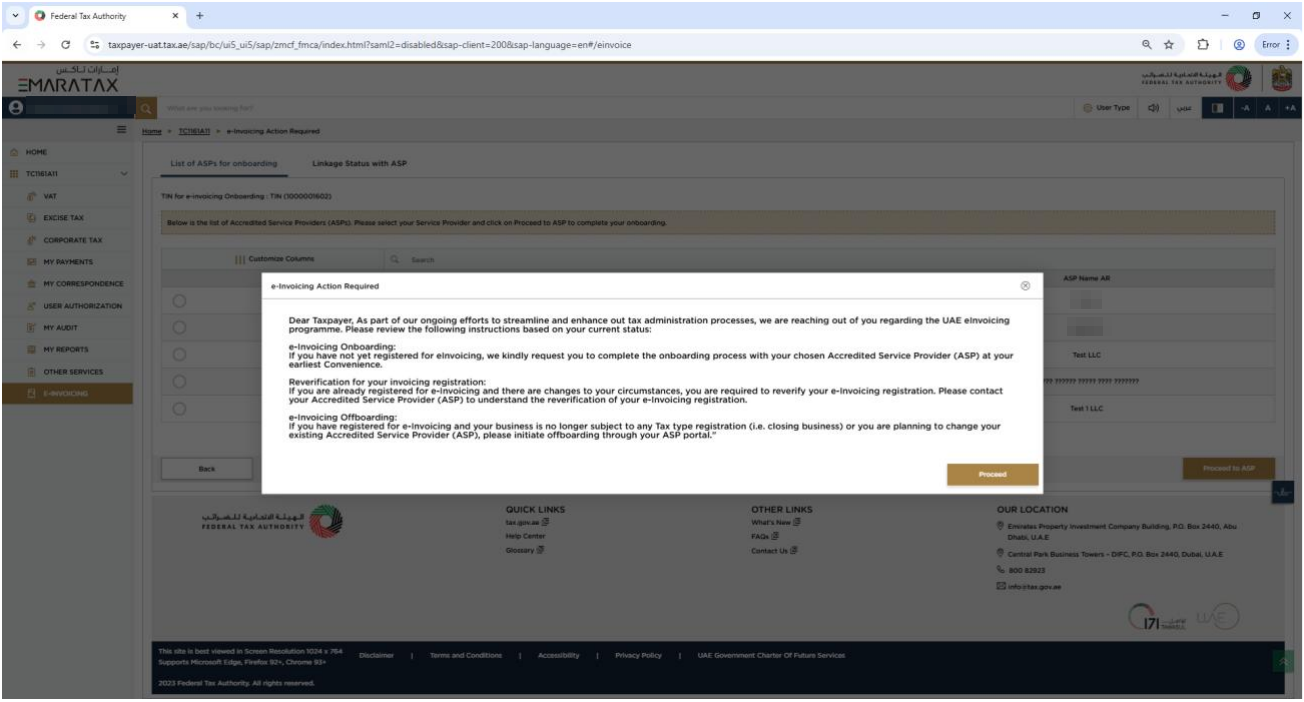
EmaraTax shows an e-Invoicing Action Required notice that summarizes onboarding, reverification and offboarding. The taxpayer clicks Proceed.
Choose A-Cube and leave EmaraTax
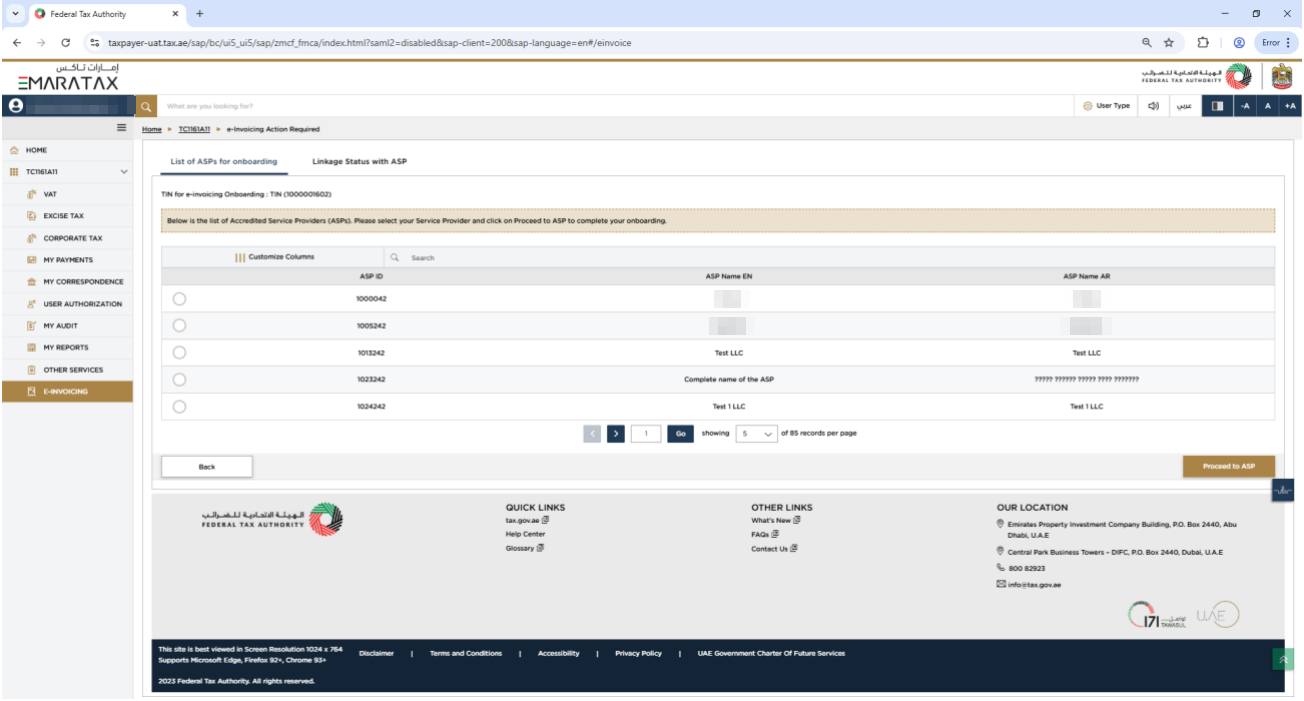
The List of ASPs for onboarding tab lists the accredited providers. The taxpayer selects A-Cube, listed as PLATFORM ACUBE TECHNOLOGIES L.L.C, and clicks Proceed to ASP.
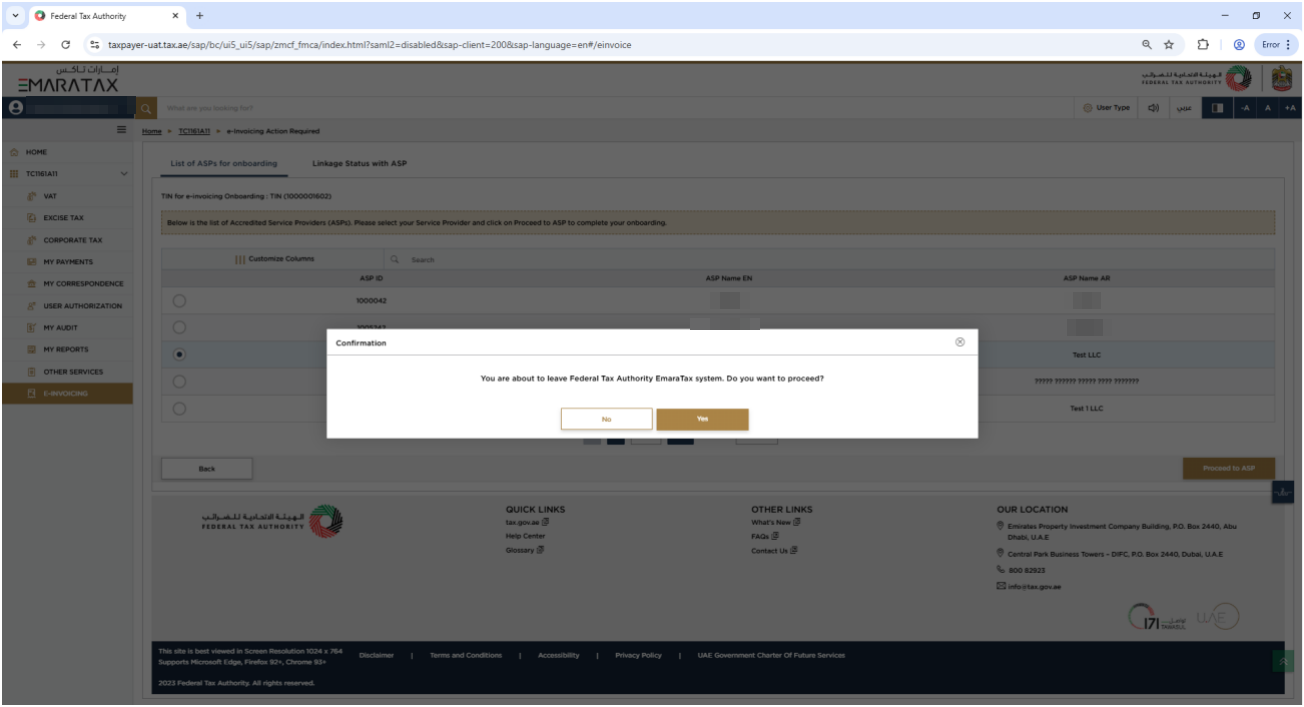
EmaraTax asks for confirmation before leaving the portal. The taxpayer clicks Yes, and EmaraTax redirects them to the A-Cube onboarding page.
On the A-Cube onboarding page
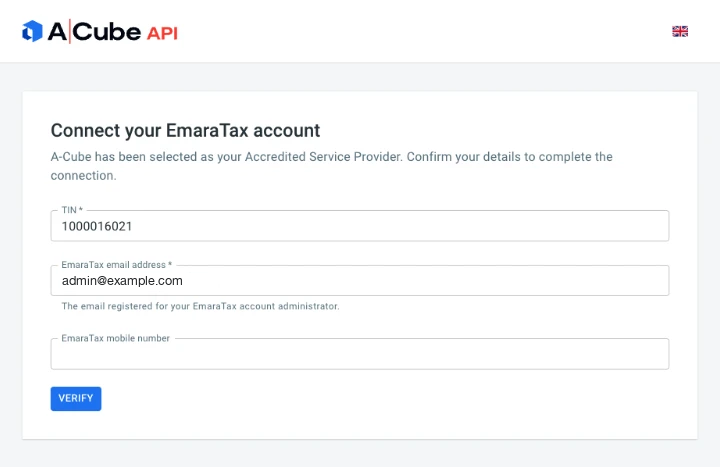
The A-Cube onboarding page, Connect your EmaraTax account, completes the onboarding in four screens. The taxpayer has five minutes from the EmaraTax redirect to complete them.
Verify the taxpayer details
The taxpayer enters the TIN, the email registered for the EmaraTax account administrator and, optionally, the mobile number, then clicks Verify. A-Cube checks these details against EmaraTax.
Confirm the entity details
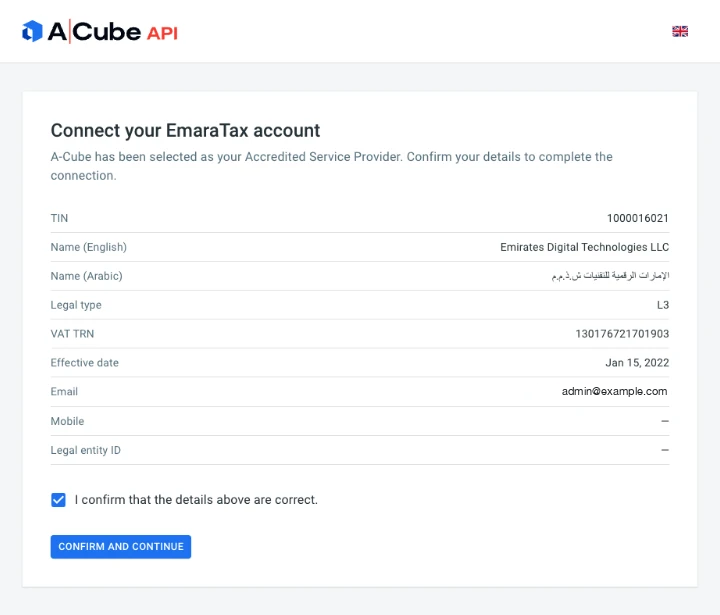
A-Cube shows the company data registered in EmaraTax: TIN, legal names in English and Arabic, legal type, VAT TRN, effective date and contact details. The data comes from EmaraTax and cannot be edited here. The legal entity ID is still empty, because the legal entity does not exist yet.
The taxpayer ticks I confirm that the details above are correct and clicks Confirm and continue.
Wait for the synchronization
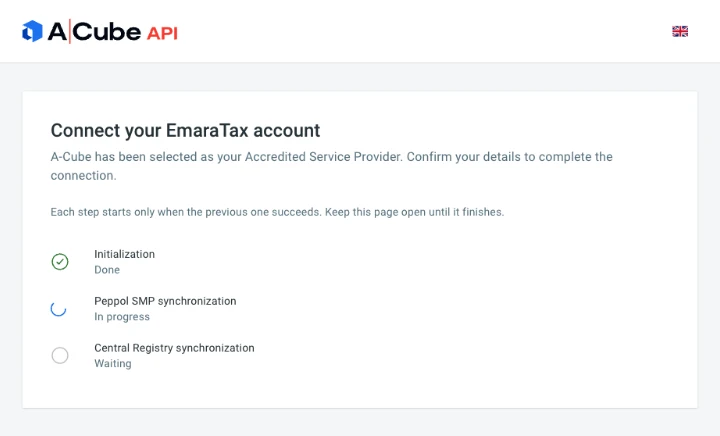
A-Cube creates the legal entity, registers it on the Peppol SMP and synchronizes it with the central registry. The page shows the progress of each step. Each step starts only when the previous one succeeds, so the taxpayer must keep the page open until the end.
Onboarding completed
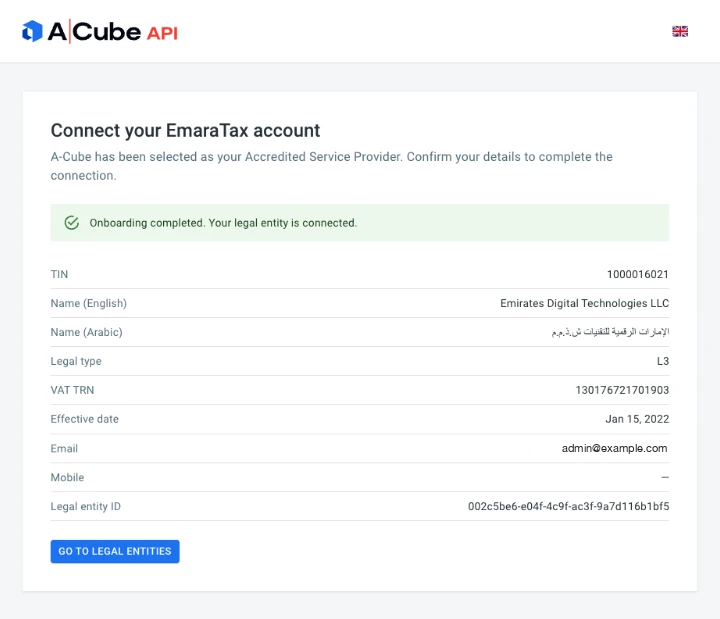
The page confirms that the legal entity is connected and shows its legal entity ID in A-Cube.
After onboarding
Once the onboarding is complete, you can see the result both in EmaraTax and in A-Cube.
In EmaraTax, the Linkage Status with ASP tab, in the e-invoicing section of the entity, shows A-Cube with status Linked and the date of the change.

In A-Cube, GET /legal-entities/{legalEntityId} returns the legal entity with status set to Active. The response also lists enabledCapabilities, the Peppol document types the entity can receive.
Example response
{
  "legalEntityId": "002c5be6-e04f-4c9f-ac3f-9a7d116b1bf5",
  "tin": "1000016021",
  "status": "Active",
  "legalType": "L3",
  "nameEn": "Emirates Digital Technologies LLC",
  "nameAr": "الإمارات الرقمية للتقنيات ش.ذ.م.م",
  "effectiveDate": "2022-01-15T00:00:00+00:00",
  "vatTrn": "130176721701903",
  "contact": {
    "email": "admin@example.com",
    "mobile": null
  },
  "isEnabled": true,
  "enabledCapabilities": [
    {
      "key": "billing.invoice",
      "domain": "billing",
      "type": "invoice",
      "docScheme": "peppol-doctype-wildcard",
      "docValue": "urn:oasis:names:specification:ubl:schema:xsd:Invoice-2::Invoice##urn:peppol:pint:billing-1@ae-1*::2.1",
      "processScheme": "cenbii-procid-ubl",
      "processValue": "urn:peppol:bis:billing"
    }
  ],
  "createdAt": "2026-08-13T10:52:47+00:00",
  "updatedAt": "2026-08-13T10:52:55+00:00",
  "smpSyncAt": "2026-08-13T10:52:52+00:00",
  "registrySyncAt": "2026-08-13T10:52:55+00:00"
}
The example shows only one capability. See the Quick Start for the full list.
To refresh the data of a linked taxpayer, or to remove the link, see Updating Legal Entity.
Onboarding via API
To proceed through the API, the taxpayer must first complete the steps in EmaraTax, up to the redirect to the A-Cube onboarding page. EmaraTax adds the authorization code to the URL of that page, in the authcode query parameter:
https://dashboard.acubeapi.com/ae/onboarding/init?authcode=005056BEB8E01FE0A0B5B33ECD13F7DE
Extract the code from the URL and send it as token in the verification call, then continue with the calls below. The code is single-use, so each onboarding runs either on the page or through the API, not both.
Each call matches a step of the A-Cube onboarding page:
| On the A-Cube onboarding page | API call |
|---|---|
| Verify | POST /legal-entities/onboarding/verify |
| Confirm and continue, then Initialization | POST /legal-entities/onboarding/init |
| Peppol SMP synchronization | POST /legal-entities/onboarding/sync-smp |
| Central Registry synchronization | POST /legal-entities/onboarding/sync-central-registry |
The passport
The API enforces the order of the four steps with a short-lived, signed JWT called the passport: every step returns one in the passport field, and you send it back on the next call in the X-Onboarding-Passport header.
- One per step. Always send the value returned by the immediately preceding call, not an earlier one.
- Each one unlocks only the next endpoint. This prevents out-of-order calls and keeps partial states out of the database.
- It expires. The window to complete the chain after the EmaraTax handoff is five minutes, in the sandbox as in production.
1. Verification
POST /legal-entities/onboarding/verify is the entry point, and the only step with a body and no passport.
{
  "token": "<authCode from the EmaraTax redirect>",
  "tin": "1069086623",
  "email": "admin@mail.com",
  "action": "LINK"
}
token is the authorization code that EmaraTax adds to the redirect URL. tin, email and the optional mobile are the details the taxpayer enters on the first screen of the onboarding page. In the sandbox, use the test values from the Quick Start.
A-Cube validates the code and the TIN against EmaraTax and returns the verified company data with the first passport. Nothing is persisted yet: this step only proves that the taxpayer really did appoint A-Cube.
{
  "action": "LINK",
  "step": "INITIALIZATION",
  "isCompleted": false,
  "legalEntity": {
    "tin": "1069086623",
    "legalType": "L3",
    "nameEn": "ACube Global Technologies LLC",
    "nameAr": "إيه كيوب للتقنيات العالمية ش.ذ.م.م",
    "effectiveDate": "2024-04-01",
    "email": "admin@mail.com",
    "legalEntityId": null,
    "vatTrn": "100654190600003",
    "mobile": null
  },
  "passport": "<verification_passport>"
}
step is the step you must call next, and legalEntityId stays null until initialization creates the resource. vatTrn is null when the taxpayer has no VAT registration.
2. Initialization
POST /legal-entities/onboarding/init, with the passport from step 1 and no body. It consolidates the verified data and creates the legal entity, so this is where legalEntityId first appears. Store it: it identifies the entity in every later call.
It also sanitises abandoned sessions. If a previous attempt stopped halfway, for example when the Peppol registration succeeded but the central registry sync did not, A-Cube detects the orphaned state here and cleans it up before restarting. You do not need to handle that yourself.
3. SMP Sync
POST /legal-entities/onboarding/sync-smp publishes the entity's receiving capabilities to the Peppol SMP, which is what makes it addressable on the network. Until this succeeds the entity cannot receive anything.
4. Central Registry Sync
POST /legal-entities/onboarding/sync-central-registry seals the registration with the government central registry and returns 204 No Content. There is no final payload: the status code is the completion signal.
Errors and retries
- Verification is rejected. If the email is not the administrator email registered in EmaraTax for that TIN, verification fails and the onboarding cannot continue until the details are correct.
- The time runs out. The flow must be completed within five minutes of the EmaraTax redirect. After that, the taxpayer must start again from EmaraTax, because the authorization code is single-use.
- An API step fails. If you drive the flow through the API, retry the failed call with the same passport while it is still valid. Passports are bound to a specific next endpoint, so a retry cannot skip ahead.
Onboarding emits the legal_entity.synchronized webhook as synchronization steps complete. See Event Types to drive the flow asynchronously instead of waiting on the responses.