Statuses and where to see them
Track the status of each uploaded file and its documents. Uploads and documents are resources of the Transfer REST API, each with its own status:
- An upload is one file you send. API resource: Upload,
GET /uploads/{id}. - A document is a file Transfer tracks for that upload. API resource: TransferDocument,
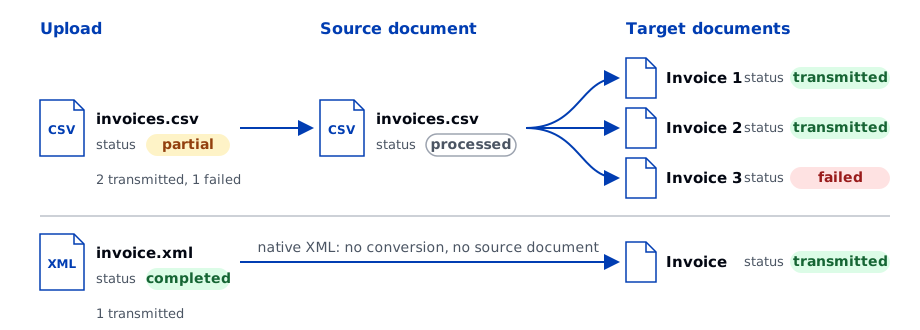
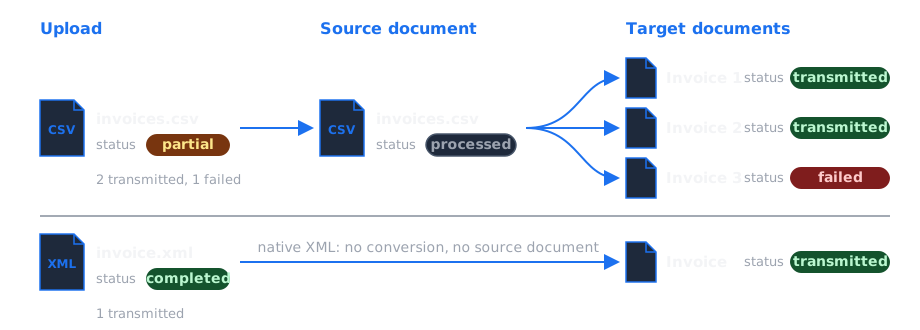
GET /transfer-documents/{id}. Its role is one of:- source document: a file that requires conversion, such as a CSV;
- target document: a document sent to the destination. Native XML, such as FatturaPA, is directly a target document.
A CSV with 10 invoices creates one upload, one source document, and 10 target documents. Transfer opens ZIP and P7M archives and tracks the documents inside.
Statuses
Upload statuses
Values of status in the Upload resource.
| Status | Meaning | Final |
|---|---|---|
pending | Transfer created the upload from a REST API request and has not started processing the file yet. | No |
ingested | Transfer received the file. The upload stays in this status while any of its documents is in progress. | No |
completed | At least one target document was transmitted and no document failed. | Yes |
partial | At least one target document was transmitted and at least one document failed. | Yes |
failed | No target document was transmitted, or Transfer could not store a file sent through the REST API. | Yes |
Document statuses
Values of status in the TransferDocument resource, by role.
| Role | Status | Meaning | Final |
|---|---|---|---|
| Target | new | Transfer created the document and is waiting for the result of the transmission. | No |
| Target | transmitted | The destination API accepted the document. transmission_outcome is ok. | Yes |
| Target | failed | The destination API rejected the document, or Transfer stopped it before sending. transmission_outcome is error. The cause is in the violations of the document. | Yes |
| Source | new | Transfer received the file and is processing it. | No |
| Source | processed | A target document of the same upload reached transmitted or failed. | Yes |
| Source | failed | A violation stopped the file while Transfer was reading it or mapping it. The cause is in the violations of the document. | Yes |
The API defines reserved values that Transfer does not currently use: processing for uploads and documents, transmitting, and pending for transmission_outcome. Treat them as in progress.
transmission_outcome is ok or error on target documents and empty on source documents.
In the lineage, CSV target documents link directly to the source CSV. Individual rows are not tracked as documents.
How statuses change
Upload:
Target document:
Source document:
How the upload status is calculated
Transfer calculates the final upload status when all its documents have finished:
completed: at least one target document has outcomeok, and no document failed.partial: at least one target document has outcomeok, and at least one document failed.failed: all other cases, including no target document with outcomeok.
A source CSV with conversion failures counts as one failed document, regardless of the number of failed rows.
An upload can remain ingested if nothing is processed, for example with an unsupported format. See Troubleshooting.
Where to see the outcomes
| Where | What you see | Availability |
|---|---|---|
| Tracking via API | Every upload and document, with violations and lineage | Available |
| Transfer webhooks | Success or failure callbacks to your application | On request; confirm coverage for your destination, format and channel |
| Invoice transfers page | The invoices Transfer sent, where the destination has this page | Available |
| Email digest | An hourly summary of files that failed or succeeded | Available |
| Daily report | A CSV in your home directory with the outcome of each upload and document | Available |
The API is the only place that shows every failure.
Invoice transfers page
Invoice transfers in the A-Cube dashboard lists the invoices Transfer sent, with file name, supplier and customer, invoice number, date and type, creation time and violations. Filter by creation time, file name or presence of violations. Each destination page says whether the page exists for that destination and what it adds, such as the SdI outcome for Italy.
Its violations are the destination's validation errors, a field and a message, without the code, value and context of a violation object.
The page lists an invoice only after Transfer has read the file and run its first checks. It does not show:
- CSV reading and conversion failures, and other failures before Transfer creates an invoice.
FIELDS_MISSINGandFILE_TOO_LARGEviolations.- Duplicates that Transfer already processed.
Use the tracking API for these.
Outcome after Transfer
transmitted means that A-Cube's service for the destination accepted the document. The destination can still reject it later, for example SdI for an Italian invoice. That later outcome does not change the Transfer status: the document stays transmitted, with transmission_outcome ok and no new violation.
Each destination page says where to read the later outcome.