A-Cube Transfer
A-Cube Transfer connects your ERP or accounting software to A-Cube's e-invoicing services with a single integration. Send the files your system already exports through SFTP or the REST API: Transfer converts them when needed, delivers each document to the right platform, such as SdI in Italy, KSeF in Poland or the Peppol network, and gives you the outcome of every document in one place.
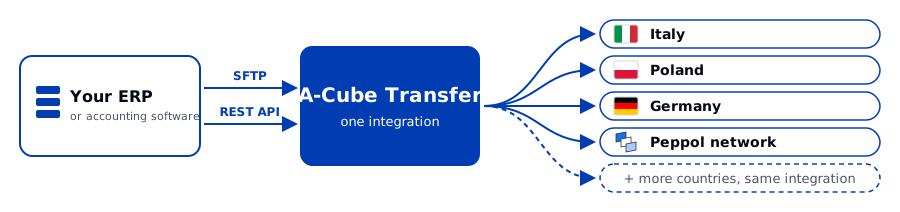
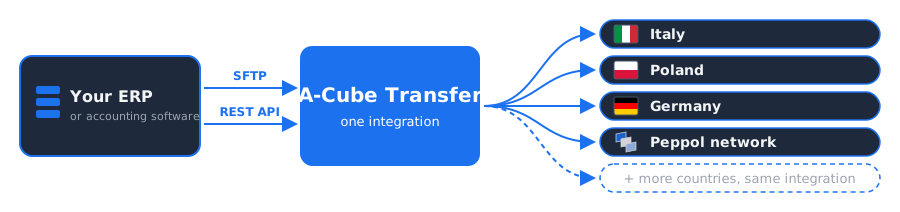
A-Cube sets up your access and formats during onboarding and handles the connection to each destination. When you add a country, you keep the same channels, the same tracking API and the same way of working.
Use cases
Availability
Every capability has one of two availability levels:
- Available: A-Cube enables it when you ask, with no development.
- Custom: A-Cube builds it for you, such as a custom CSV format.
To request a capability, contact A-Cube.
| Capability | Availability |
|---|---|
| Upload via SFTP, with password or SSH key | Available (A-Cube registers the SSH key) |
| Upload via REST API | Available, where the destination supports it |
| Amazon S3 and AS2 integration | Contact A-Cube to agree the connection and onboarding |
| Sandbox and production environments | Available |
| Standard CSV format and native XML of the destination | Available |
| ZIP archives | Available |
| Tracking via API: uploads, documents, End-to-end ID | Available |
| Success and failure webhooks | Available where supported; A-Cube confirms coverage for your destination, format and channel |
| Email digest and daily report | Available |
| Read-only directories, deleting XML after transfer, custom home directory | Available |
| Received documents delivered to your SFTP directories | Available |
| Custom CSV format and other input formats, also for received documents | Custom |
Some capabilities depend on the destination, such as P7M files, PDF attachments, drafts and the dashboard page. The Transfer page of each destination lists them.
Destinations
A destination is where Transfer delivers your documents: a country's e-invoicing platform, such as SdI in Italy or KSeF in Poland, or a network such as Peppol. Transfer reaches every country and network A-Cube serves through the same integration: tell A-Cube where you want to send your documents, and it enables those destinations for your account during onboarding.
What changes from one destination to another, such as the SFTP username, the standard CSV format, size limits, duplicate handling and where to read the outcome, is on the A-Cube Transfer page of each destination:
| Destination | E-invoice format |
|---|---|
| Belgium | Peppol UBL |
| France | UBL or CII |
| Germany | XRechnung or ZUGFeRD |
| Italy | FatturaPA |
| Norway | EHF Billing 3.0 |
| Peppol | Peppol UBL |
| Poland | KSeF FA(3) |
| Slovakia | Peppol BIS Billing |
| Spain | Facturae |
| United Arab Emirates | PINT AE UBL |
Everything else works the same way for every destination. One SFTP username gives access to one destination.
How to start
- Contact A-Cube with the destinations, channels and formats you need.
- Read Onboarding and access to see what you receive.
- Send a first file in sandbox with the Quickstart SFTP.
For complete API examples, follow UBL JSON to KSeF or CSV to SdI. Each tutorial takes you from your file to the destination outcome, including authentication, processing errors and retries. For callbacks to your application, see Transfer webhooks.