Frequently Asked Questions
My Stripe plan has expired, I did not renew it before the expiry date, and I am having difficulty renewing it myself.
If your subscription is interrupted for any reason (change of credit card, insufficient funds, temporary suspension of the subscription, etc.), renewal may require assistance from a customer service representative, and reactivation may take an average of 2 working days. We strongly recommend that you act well in advance and bear in mind that the service may not be available immediately.
Is it possible, before going live, to activate and test the A-Cube app in a ‘controlled’ ‘test’ environment where only simulations are carried out, with no impact on the real world?
Yes, you can test Stripe and the associated A-Cube app in ‘Test’ mode.
Please note: not in ‘Sandbox’ mode: at present, the A-Cube app does not support ‘Sandbox’ mode, only ‘Test’ mode.
We strongly recommend that you invest time in this testing phase, as the workings of the tax system are highly complex and the possible
scenarios that may arise are numerous and varied.
Before proceeding to the production environment, it is essential to have tested every possible scenario and to have validated the results
with your tax adviser, who is the only person able to confirm that the results are accurate in relation to your company’s actual circumstances.
I use Stripe to accept payments and issue tax receipts: how do I comply with the POS/RT connection requirement?
As the tax receipts are not sent via a cash register, there is no need to specify a terminal or serial number; the process is carried out online via the procedure provided by the Italian Revenue Agency (Agenzia delle Entrate), known as ‘Documento Commerciale on line’. This is how it works: “…merchants using the ‘Online Commercial Document’ (Documento commerciale online) web procedure must register the link with their POS terminals within that same ‘Online Commercial Document’ (Documento Commerciale Online) web procedure. In practical terms, this involves registering the link between the POS terminals’ unique identification data and the ‘Online Commercial Document’ (Documento commerciale online) web procedure …”.
Is Stripe considered a virtual POS?
Yes, the Italian Revenue Agency (Agenzia delle Entrate / AdE) considers it a virtual POS, and the relevant details are as follows:
Italian/foreign acquirer: Foreign
Acquirer tax code (Codice Fiscale): 97979220155
Acquirer name: Stripe Technology Europe, Limited"
The details shown above must be entered into the tax portal, following the procedure set out in the file entitled ‘Collegamento_POS_RT-Allegato 2_ Manuale Operativo.pdf’;
download it, open it and follow the instructions step by step.
POS/RT Connection Requirement for Smart Receipt
The following information is provided for guidance only; our support is limited solely to the technical aspects of the services we provide directly. For tax-related queries, we always recommend that you check with your accountant to ensure the solution is appropriate for your company’s needs; we do not act in place of a tax professional.
The ‘Smart Receipt’ or ‘Velocizzatore’ solution provides access to your tax register via the ‘authorisation’ you have granted to A-Cube, therefore, from a practical point of view, the till is exempt from tax registration given that the business owner has chosen to fulfil the obligation to store and transmit payment details via the online procedure made available by the Italian Revenue Agency. Receipts are generated directly on the Revenue Agency’s (Agenzia delle Entrate) portal, not by another device with a serial number or code. On this basis, the relevant case is set out and referenced in the documentation available on the Revenue Agency’s website, which I have attached to this document: I have included an extract below, the full text of which can be found on page 5 of the file ‘GuidaOperativa CorrispettiviElettronici’ Traders using the ‘Online Commercial Document’ (Documento Commerciale Online) web procedure must register the link with the POS terminals within the same ‘Online Commercial Document’ (Documento Commerciale Online) web procedure. In practical terms, this involves registering the link between the unique identifier of the POS terminals and the ‘Online Commercial Document’ (Documento Commerciale Online) web procedure.
For further details, a video of the A-Cube webinar on this topic is available: (for point 4, see minute 19:01) https://watch.getcontrast.io/register/a-cube-corrispettivi-elettronici-smart-tutto-quello-che-devi-sapere-sull-adeguamento-in-vigore-dal-2026
What does a Stripe user have to do in order to comply with the new regulations on the RT–POS link?
The information given below is indicative only: our technical support limits its scope to questions concerning our own services.
For all tax-related questions, it must always be your own tax professional who sets out the guidelines that are appropriate and correct for your case.
On the Italian Revenue Agency ("Agenzia delle Entrate") website there are 3 specific documents dealing with this topic ( https://www.agenziaentrate.gov.it/portale/collegamento-pos-rt ). If you are unable to find them, send us a request via ticket and we will provide them to you.
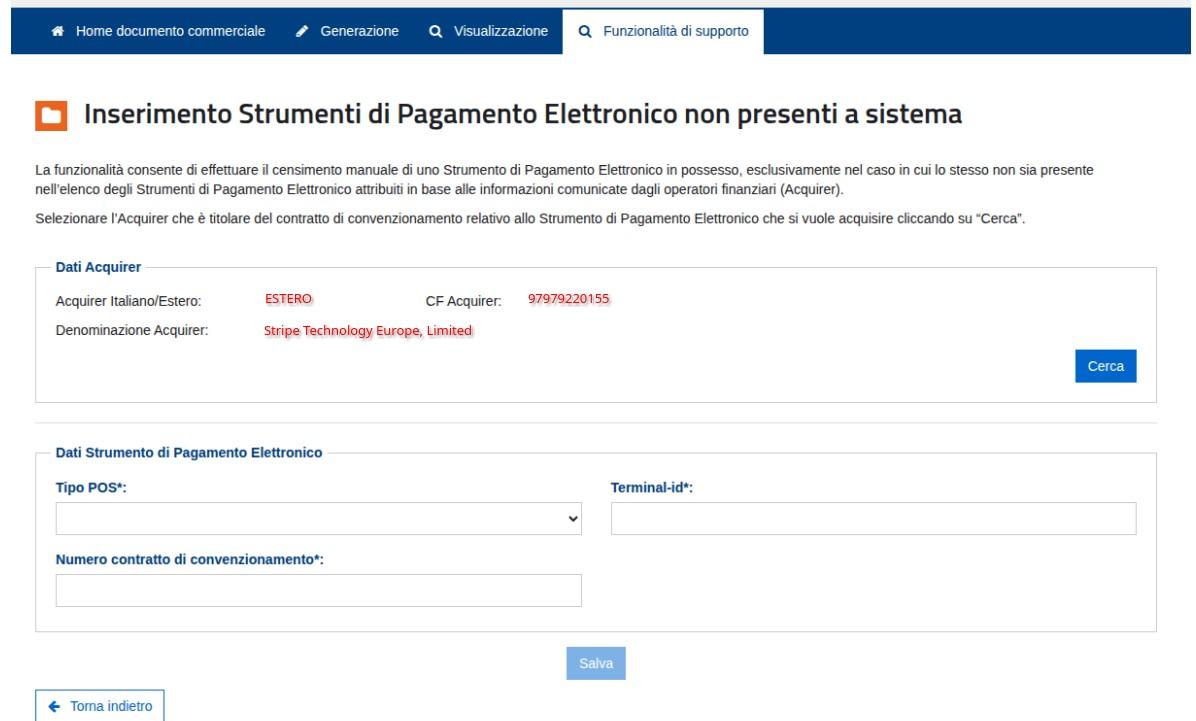
The documentation states that there is an obligation to report the platform used to receive payments (in this specific case, Stripe) in a way similar to what happens with a physical POS terminal. The service provider has given us the official data to be entered in the AdE data-request window.
Italian/foreign Acquirer: Foreign
Acquirer tax code (CF): 97979220155
Acquirer name: Stripe Technology Europe, Limited
After every operation, we recommend always checking that there is a match in the A-Cube dashboard: the Stripe dashboard handles the payment side, while the A-Cube dashboard shows its tax-side counterpart. The two should always line up, if they don't, something has not gone as it should, so please review the case carefully.
Can I issue invoices for transactions that happened before installing the app?
No, the app only processes transactions that occur after it has been installed and configured. Past transactions are not automatically retrieved.
Do I need a Stripe account to use the A-Cube app?
Yes, the A-Cube e-invoicing app is installed directly from the Stripe App Marketplace, so an active Stripe account is required in order to install and configure it.
I’ve created the receipt but it doesn’t appear in the dashboard amongst the sent ones; it seems it hasn’t been sent automatically?
Submissions are blocked for a predetermined period of time to prevent duplicate submissions for those who use the additional service known as ‘Stripe Billing’. Even if you do not use this service, this rule still applies to everyone. (It is normal to wait at least 60 minutes or even longer.)
I issue a document (receipt or invoice) from the A-Cube dashboard but I can’t see it in the Stripe dashboard, why is that?
Yes, that’s normal. The data is stored in two different databases; when you create a document in the Stripe dashboard, it becomes visible in the A-Cube dashboard, but the reverse is not the case.
I am creating a B2C invoice. I have populated the ‘customer_fiscal_code’ metadata field, but I am getting the error “Fiscal code is required for B2C”. Why is this?
This metadata is used to generate the B2C invoice ONLY IF the payment is made by a GUEST user (i.e. the user is not already registered in the STRIPE customer database). If the customer making the payment is already on record,
then the tax code (Codice Fiscale) MUST be entered in the relevant customer details.
The metadata you have associated with the payment is retrieved for invoicing only if the payment is not linked to a Stripe customer (guest mode), as stated on the documentation page: https://docs.acubeapi.com/documentation/connectors/stripe/payments
If you wish to link the transaction to Stripe customers, follow this procedure by entering the metadata in the customer details: https://docs.acubeapi.com/documentation/connectors/stripe/customer_fields
Where are the tax code (Codice Fiscale) and VAT number sourced from: a customer in the master database vs an occasional customer; if the invoice is generated for a Customer listed in the Stripe master database, where are the tax details retrieved from?
All from the Customer:
Data -> Customer
Partita IVA (VAT number) : tax_ids
Codice fiscale (Fiscal code) : metadata fiscal_code
Codice destinatario : metadata codice_destinatario (alternatively recipient_code, sdi_recipient_code)
Denominazione e indirizzo (Name and address) : name, address
If the Stripe object does not contain the Customer object already expanded, it is retrieved from the API at the time of processing, so the up-to-date data is used.
Where do the tax code (Codice Fiscale) and VAT number come from: a customer in the master database versus a one-off customer; if the payment is linked to a customer in the master database, do the metadata supplement the customer’s details or replace them?
They replace them, field by field. When a payment is linked to a customer, every customer_* metadata field present on the payment object takes precedence over the corresponding data in the master database.
In particular, is customer_tax_id added to the customer’s tax IDs?
No, it replaces them entirely. If customer_tax_id is present on the PaymentIntent, the customer’s tax IDs are ignored completely.
Practical consequence: an incorrect or out-of-date customer_tax_id on a payment masks the correct VAT number recorded in the master data. If the master data is already correct, the safest approach is not to populate that metadata field.
Is the VAT number’s country code derived in the same way in both scenarios?
No, and this is the key difference to bear in mind:
Tax ID in the master data → Country ID is derived from the ‘country’ field of the Tax ID, so it is consistent with the VAT number by definition;
customer_tax_id metadata → Country ID is derived from the customer’s address (customer_address_country, or the country in the master data).
In the second case, a customer_tax_id of DE123456789 for a customer with a US address results in IdPaese=US and IdCodice=123456789. Using the metadata, the country of the address must therefore match the country of issue of the VAT number.
Does the distinction between an invoice and a commercial document follow the same logic?
Essentially, yes. It is always the presence of a VAT number that determines whether it is B2B or B2C, but with separate sources when the Stripe object does not contain the expanded Customer: for Stripe invoices, the list of Tax IDs recorded on the invoice itself is used; for payments, the customer_tax_id metadata is used.
For a one-off payment, the absence of a customer_tax_id therefore results in it being treated as B2C, both in terms of the document type and the classification of the recipient.
Summary: what details do I need to provide for an overseas customer?
Customer in the master data -> add a Tax ID to the Stripe Customer;
One-off customer -> provide the customer_tax_id and customer_address_country fields on the PaymentIntent.
If either of these is missing, the transaction is treated as B2C and the standard code 00999999999 appears on the invoice, linked to the country of the address.
Does anything change for an Italian customer?
Only the location of the data changes, not the rule: the tax code (Codice Fiscale) is retrieved from the fiscal_code metadata on the Customer record if the customer is
in the master database, and from the customer_fiscal_code metadata on the payment object if they are a one-off customer. For Italian B2C customers,
the tax code (Codice Fiscale) is mandatory: if it is missing, the invoice will not be generated.
I need to issue a B2C invoice but I can’t get the recipient’s tax number to appear in the XML file.
The metadata you have associated with the payment is only retrieved for invoicing if the payment is not linked to a Stripe customer (guest mode), as explained on the documentation page: https://docs.acubeapi.com/documentation/connectors/stripe/payments
If you wish to link the transaction to Stripe Customers, follow the procedure outlined here: https://docs.acubeapi.com/documentation/connectors/stripe/customer_fields
by entering the metadata in the customer details.
Where can I check the status of an invoice generated from a Stripe transaction?
You can monitor the status of each invoice, from issuing to delivery, directly from the Stripe dashboard without leaving the app.
From the A-Cube/Stripe dashboard, I can see that I have some invoices on hold (not sent to the SdI) because they were created without the private individual’s tax code (Codice Fiscale). How should I proceed?Once I’ve corrected the document or master data to include the tax code (Codice Fiscale), will they be sent automatically?
No, the process is not automatic. First of all, you must correct them; one way to do this is by using the dedicated button on the A-Cube/Stripe dashboard. After that, they must be sent one by one using the appropriate button.
Are credit notes in Stripe/A-Cube created automatically?
Credit notes are created automatically when a refund or a credit note is issued in Stripe.
Submission to the SdI is automatic as well, but only if two conditions are met:
automatic document sending must not be set to "Off", and the original invoice must already have been accepted by the SdI.
That second condition is the most common reason for a credit note left pending:
if the refund happens shortly after the payment, the invoice is still awaiting the SdI outcome, so the credit note is created but not transmitted.
In that case you need to complete the submission manually, either from our app on the original transaction screen or from our dashboard,
the invoice being accepted later does not trigger the submission on its own.
I've issued a refund, is the digital receipt (corrispettivo) voided automatically, or do I have to do it manually?
It depends on the type of refund:
Full refund: if Stripe's refund webhook (charge.refunded) is enabled on your account, the digital receipt is voided automatically, with no action required on your part.
Partial refund: it depends on how the refund originates. If a partial credit note is issued against a Stripe invoice, the return of the affected line
items is processed automatically; if instead it is a partial refund on a payment (charge), automatic processing is not supported and the return
has to be handled manually.
After every operation, we recommend always checking that there is a match in the A-Cube dashboard:
the Stripe dashboard handles the payment side, while the A-Cube dashboard shows its tax-side counterpart.
The two should always line up, if they don't, something has not gone as it should, so please review the case carefully.
I have created a credit note for an invoice, but once I sent it, it disappeared from the dashboard; I’m not sure whether it was sent correctly or not.
Please note that in the transaction details, credit notes are divided into two lists: ‘Credit notes issued’ (to be sent) and ‘Credit notes sent’ (already sent). Once sent, the credit note moves from the first list to the second, so it hasn’t been lost: if you can’t see it, please refresh the page. However, the A-Cube dashboard remains the most convenient way to check all documents and their statuses at a glance. The quickest way to check all issued documents and their status is to view them via the A-Cube dashboard, which you can access at: https://dashboard.acubeapi.com/dashboard
How is the 2.00 Euro stamp duty (Bollo) handled?
The logic behind the stamp duty (Bollo) calculation is determined by the VAT category based on:
For each line item, the app calculates the VAT category by analyzing the customer’s country, VIES status, product type, and any metadata.
If the total of all lines with a VAT category of exempt/excluded/non-taxable (N2.1, N2.2, N3.5, N3.6, N4) exceeds €77.47,
then the virtual €2.00 stamp is included in the XML file.
How do I add the EUR 2.00 stamp duty (bollo) to an invoice?
To begin with, a line item for the stamp duty must NOT be added manually: when the stamp duty has to be applied, the system creates that line automatically through the "Apply invoice stamp automatically when needed" feature; adding it by hand would duplicate it.
Applying the stamp duty does not affect the document total. In the XML, the system:
inserts the "DatiBollo" block with BolloVirtuale = SI and ImportoBollo = 2.00, which is the declaration that the stamp duty has been paid virtually;
subtracts 2.00 from the amount of the first exempt line on the invoice;
adds a "Bollo in fattura" line of 2.00 (VAT rate 0.00, nature N2.2);
updates the DatiRiepilogo accordingly.
To check before sending: the total shown on the draft is exactly the ImportoTotaleDocumento value that will end up in the XML.
If the draft shows 100.00, the XML will report a total of 100.00, made up of an item line of 98.00 plus a "Bollo in fattura" line of 2.00.
I issue invoices to private individuals in Italy, the EU and outside the EU, how is VAT calculated?
A-Cube generates the XML file by interpreting the values of the tags returned by Stripe. Stripe is sometimes able to assign VAT correctly, and sometimes it is NOT. If it does return a value, A-Cube creates the XML based on that value. If, on the other hand, Stripe is not able to do so, A-Cube applies the assignment automatically only where it can produce an XML that is fiscally consistent.
Practical example: I receive a payment of EUR 122.00; Stripe is not able to assign the VAT; the default VAT rate set in the options is 22%; the customer has EU nationality, an XML is produced with a payment total of EUR 122.00, of which EUR 22.00 is VAT.
Same case but with a customer of US nationality (i.e. outside the EU): payment total of EUR 122.00, of which EUR 0.00 is VAT.
How are the VAT Nature (Natura IVA) and the VAT rate assigned?
The A-Cube/Stripe app must be properly configured in every part that involves the VAT rate. The recommendation is that it be declared explicitly in the product records and anywhere the relevant field is available. If no VAT rate is available from Stripe at the point where the document is created, the logic is as follows:
if a natura_iva metadata field is set on the product, on the price or on the payment, that value is used;
otherwise the Nature is calculated from your tax regime, the country of the customer’s billing address, the customer’s VAT number (validated against VIES) and the nature of what is sold (goods or services);
if no Nature applies, the default VAT rate from the profile settings is applied, and it is unbundled from the line item amount (the payment amount is treated as VAT included).
For a customer without a valid VAT number, the result is:
| Customer | Ordinary regime (RF01) | Flat-rate regime (RF19) |
|---|---|---|
| Italy | default VAT rate | N2.2 |
| Other EU country | default VAT rate | N2.2 |
| Outside the EU | N2.1 for services, N3.1 for goods | N2.1 for services, N3.1 for goods |
For a B2B customer in another EU country whose VAT number is validated in VIES, the result is N2.1 for services and N3.2 for goods.
Whether what you sell is treated as goods or as services is taken from the product_nature metadata, otherwise from the shippable flag of the Stripe product, otherwise from the default value in the app settings.
If none of the above can produce a fiscally consistent document, for example the product nature cannot be determined, or no Nature applies and the default VAT rate is zero, the document is not created and the error is reported.
See: https://docs.acubeapi.com/documentation/connectors/stripe/vat_rate
I am invoicing a customer based outside Italy, but the supply is territorially relevant in Italy and Italian VAT must be applied. How do I get the connector to behave this way?
There is no setting that forces a VAT rate by country. The connector applies the VAT rate it receives with the transaction, and determines the treatment on its own only when no VAT rate is available at all: in that case a customer with a non-EU billing address is treated as a supply that is not subject to VAT (Nature N2.1 for services, N3.1 for goods), which is what produces the 0% invoice.
To have Italian VAT applied regardless of the customer’s country, supply the rate together with the payment, using the line item metadata on the PaymentIntent (https://docs.acubeapi.com/documentation/connectors/stripe/payments):
line_1_description- the description of the lineline_1_unitprice- the unit price in cents and net of VATline_1_quantity- the quantity (defaults to 1)line_1_vatrate- the VAT rate, e.g.22
When a VAT rate is provided this way, it is used as it is and the automatic country-based determination is not applied. Two points to keep in mind:
line_<n>_unitpriceis net and the VAT is added on top: a payment of EUR 80.00 with 22% VAT included must be declared as6557with aline_1_vatrateof22, which produces a taxable amount of EUR 65.57 plus EUR 14.43 of VAT, totalling EUR 80.00.- When line item metadata are present, the document total is built from the lines, not from the payment amount: every component of the order (shipping, fees, discounts) must be declared as a line, so that the total matches the amount actually charged.
Once VAT is applied, the virtual EUR 2.00 stamp is no longer added, as there is no longer any non-taxable amount.
If you issue Stripe invoices or subscriptions rather than payments, the equivalent is to apply a Stripe tax rate to the invoice line items: the connector reads it from the Stripe Invoice object. Line item metadata are used for invoices only, and are ignored when a receipt (documento commerciale) is created,in that case the default VAT rate from the app settings always applies, regardless of the customer’s country.
The information above concerns the behaviour of the connector only: whether a supply is territorially relevant in Italy, and which rate applies, must be assessed with your accountant.
Is it correct to rely on A-Cube's tax numbering only and ignore Stripe's?
Yes. It is A-Cube, not Stripe, that submits the invoices to the SdI, so the numbering that matters for tax purposes is the one generated by A-Cube.
Do zero-total invoices, which therefore do not generate an invoice, "consume" numbers from the series submitted to the SdI?
No, they do not. The number is assigned automatically to every document handed to A-Cube for submission to the SdI: zero-amount invoices are not handed to A-Cube, so they do not "consume" any numbers. Remember the option "Exclude amount zero".
Does the a3_document_number metadata reflect the Stripe invoice number or the one actually submitted to the SdI, when a numbering pattern is set in A-Cube?
It reflects the number actually submitted to the SdI. When a numbering pattern is configured in A-Cube, after submission the connector reads the document
back from the platform, extracts the number that was assigned, and updates a3_document_number with that value; the same one that appears in the
Numero field of the transmitted XML. If no pattern is configured, the metadata carries the Stripe invoice number instead.
One caveat: the metadata takes its final value once submission has completed.
On a document that has not been transmitted (for example, one in a blocked state) it may contain a technical placeholder in the form getNumero(acct_…), which is not an invoice number; once the document is submitted successfully, that value is replaced by the real one.
We recommend reading the documentation in full; regarding metadata in particular, you will find references on this page: https://docs.acubeapi.com/documentation/connectors/stripe/payments
Please also remember that a sandbox environment is available, where you can run tests to answer any operational questions that come up during setup.
I'm a self-employed professional (libero professionista) and I issue my invoice when I receive payment; I use the Stripe invoice as a pro forma invoice for the customer. Is it possible to have the document date match the date I actually receive the payment, or must the document date always equal the invoice issue date?
Yes, this is the default behaviour, provided the app is configured accordingly.
In the A-Cube app settings, set "Send invoices automatically when" to "Paid": the document is then generated when Stripe registers the payment,
and the document date is taken from the payment date, not from the date the Stripe invoice was created or finalised.
Also make sure "Use current date for invoices" is disabled, since that option forces the current date instead of the transaction date.
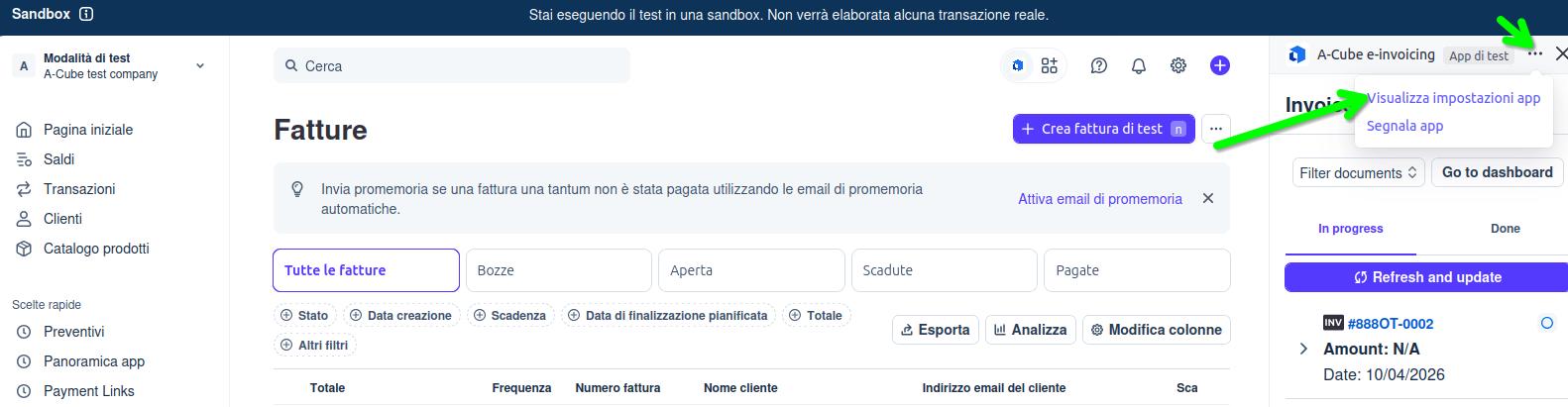
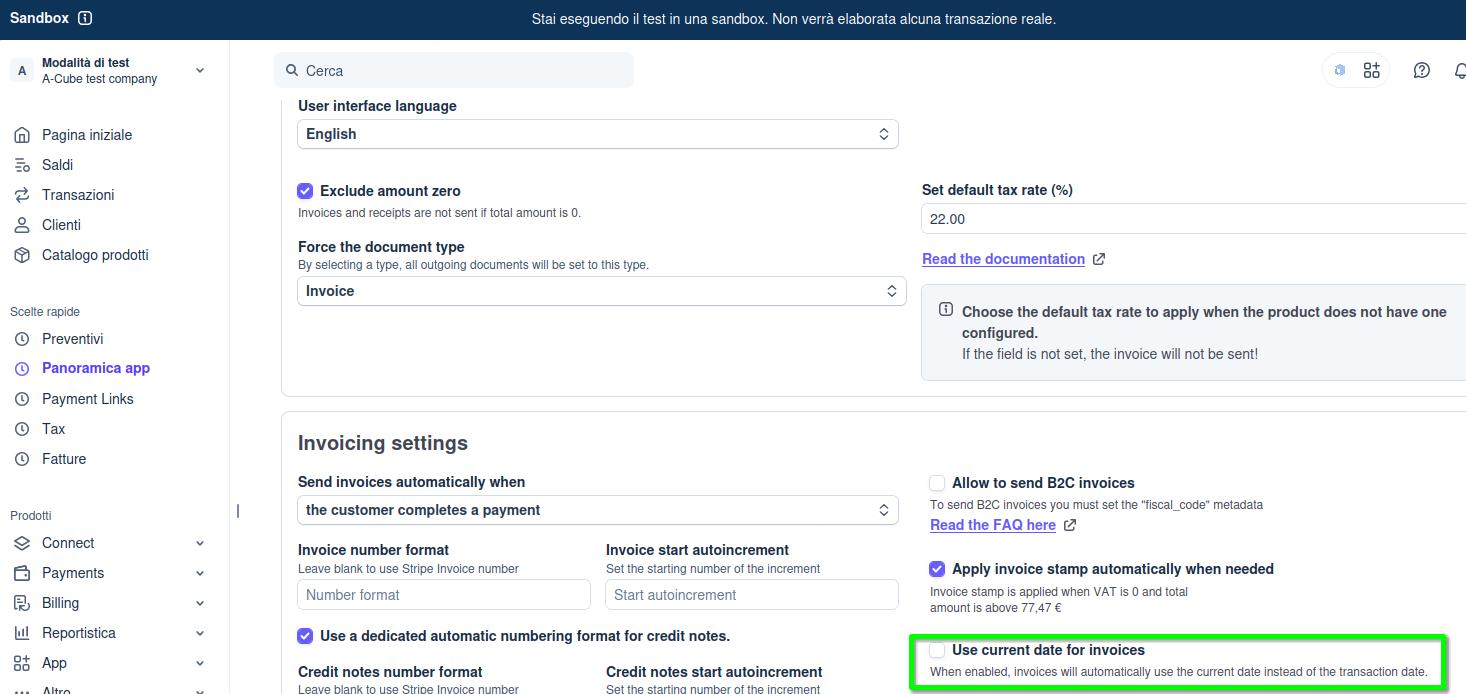 With this setup you can safely use the Stripe invoice as a pro forma document: the tax document date will match the date you actually received the payment.
Recipient Code (Codice Destinatario): is M5UXCR1 the SdI code I should give to my suppliers and register with the Revenue Agency for my account?
No, that is not the one: the code M5UXCR1, provided during registration for the service, is only used for you to receive any invoices that A-Cube issues to your company and that will be issued to you when you purchase a plan.
What is the recipient code I need to give to my suppliers?
The recipient code is the one assigned to your company by the Italian Revenue Agency (Agenzia delle Entrate, AdE).
For an overview of this topic, we recommend reading in full the information provided at this link: https://stripe.com/it/resources/more/recipient-code-for-einvoicing-italy
For the SdI code saved in customer.metadata.codice_sdi, does A-Cube read this field automatically, or do we have to use a specific key that you recognise? Is there a naming convention in the metadata that we should follow?
The metadata used to produce an electronic invoice are listed here:
https://docs.acubeapi.com/documentation/connectors/stripe/payments
Please note that the behaviour changes depending on whether the payment request is generated:
on a GUEST customer
on a customer previously registered in the Stripe customer records
the metadata mentioned in the documentation are used only when operating in GUEST mode
otherwise the document is generated using only the data previously entered in the customer record; if that data is incomplete, an error is returned and the invoice document is not created.
How do I set the SdI code (or other metadata for invoicing)?
3 options:
- By generating a Stripe Checkout session with the metadata we need: https://docs.acubeapi.com/documentation/connectors/stripe/payments
- By saving the information in the customer record: https://docs.acubeapi.com/documentation/connectors/stripe/customer_fields
See: customer_codice_destinatario, The recipient code of the customer - Via automatic payment link: https://docs.acubeapi.com/documentation/connectors/stripe/payment_links
Why can't I see my recipient code? How do I add it?
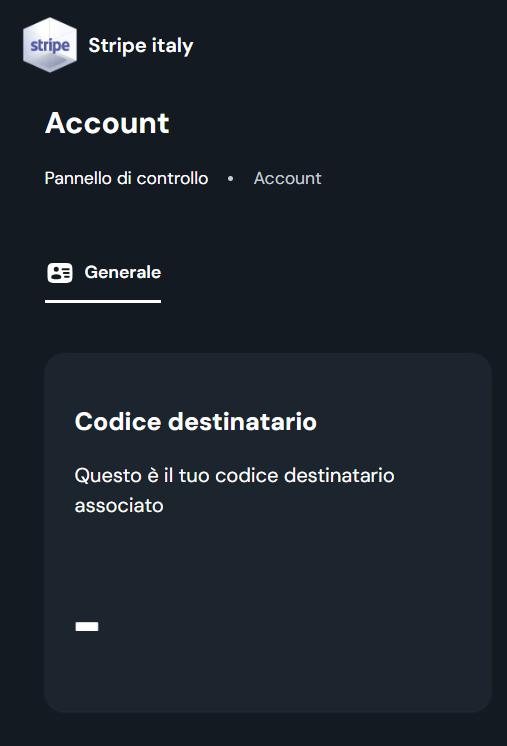
The recipient code displayed here, if you purchase a subscription that includes it, will not be the same as your company's own Recipient Code (Codice Destinatario), but rather a code assigned by A-Cube. Note: under no circumstances will it be the same as the recipient code entered in the mandatory field filled in during registration on the A-Cube portal. The recipient code specified at registration must be that of the company registering: it is used by A-Cube as the address details for issuing the invoice for the purchase of the service (the invoice issued by A-Cube to its own customer who is purchasing the Stripe service).
How do I send an invoice to the SdI from Stripe when the customer has no SdI recipient code, only a PEC address?
This feature is not available from the A-Cube/Stripe dashboard, nor via the API.
Which nodes in the XML file are supported?
<!-- Nodes generated by the A-Cube connector for Stripe (current behaviour). -->
<!-- Legend: [S] driven from Stripe (metadata/app settings) · [A] automatic · [P] filled by the platform -->
<!-- Illustrative outline: a list of nodes, not a valid XML file. -->

<FatturaElettronica versione="FPR12">                                    <!-- [P] -->
 <FatturaElettronicaHeader>
  <DatiTrasmissione>
   <IdTrasmittente><IdPaese/><IdCodice/></IdTrasmittente>                <!-- [P] -->
   <ProgressivoInvio/>                                                   <!-- [P] -->
   <FormatoTrasmissione>FPR12</FormatoTrasmissione>                       <!-- [P] -->
   <CodiceDestinatario/>                                                 <!-- [S] customer metadata; defaults to 0000000 / XXXXXXX -->
  </DatiTrasmissione>
  <CedentePrestatore>
   <DatiAnagrafici>
    <IdFiscaleIVA><IdPaese/><IdCodice/></IdFiscaleIVA>                   <!-- [A] company data; VAT number *or* fiscal code -->
    <CodiceFiscale/>                                                     <!-- [A] -->
    <Anagrafica><Denominazione/></Anagrafica>                            <!-- [A] -->
    <RegimeFiscale/>                                                     <!-- [S] app settings -->
   </DatiAnagrafici>
   <Sede><Indirizzo/><CAP/><Comune/><Provincia/><Nazione/></Sede>        <!-- [A] -->
  </CedentePrestatore>
  <CessionarioCommittente>
   <DatiAnagrafici>
    <IdFiscaleIVA><IdPaese/><IdCodice/></IdFiscaleIVA>                   <!-- [S] tax_ids / customer_tax_id -->
    <CodiceFiscale/>                                                     <!-- [S] fiscal_code metadata -->
    <Anagrafica><Denominazione/></Anagrafica>                            <!-- [S] customer name -->
   </DatiAnagrafici>
   <Sede><Indirizzo/><CAP/><Comune/><Nazione/></Sede>                    <!-- [S] customer address; Provincia not populated -->
  </CessionarioCommittente>
 </FatturaElettronicaHeader>
 <FatturaElettronicaBody>
  <DatiGenerali>
   <DatiGeneraliDocumento>
    <TipoDocumento/>                                                     <!-- [A] TD01 invoice | TD04 credit note -->
    <Divisa>EUR</Divisa>                                                 <!-- [A] always EUR, with conversion -->
    <Data/>                                                              <!-- [A] -->
    <Numero/>                                                            <!-- [S] app numbering or number metadata -->
    <DatiBollo>                                                          <!-- conditional: stamp setting + taxable amount > 77.47 -->
     <BolloVirtuale>SI</BolloVirtuale><ImportoBollo>2.00</ImportoBollo>
    </DatiBollo>
    <ScontoMaggiorazione><Tipo/><Importo/></ScontoMaggiorazione>         <!-- conditional: Stripe customer credit balance -->
    <ImportoTotaleDocumento/>                                            <!-- [A] -->
   </DatiGeneraliDocumento>
   <DatiFattureCollegate><IdDocumento/><Data/></DatiFattureCollegate>    <!-- conditional: TD04 only -->
  </DatiGenerali>
  <DatiBeniServizi>
   <DettaglioLinee>
    <NumeroLinea/>                                                       <!-- [A] -->
    <Descrizione/>                                                       <!-- [S] line description (quantity prefixed) -->
    <Quantita>1.00</Quantita>                                            <!-- [A] always 1 -->
    <PrezzoUnitario/>                                                    <!-- [A] net total of the line -->
    <ScontoMaggiorazione><Tipo/><Importo/></ScontoMaggiorazione>         <!-- conditional: Stripe discounts/coupons -->
    <PrezzoTotale/>                                                      <!-- [A] -->
    <AliquotaIVA/>                                                       <!-- [S] Stripe tax rate or default rate -->
    <Natura/>                                                            <!-- [S] natura_iva metadata, otherwise computed -->
    <AltriDatiGestionali>                                                <!-- conditional: letter of intent and/or currency conversion -->
     <TipoDato/><RiferimentoTesto/><RiferimentoNumero/><RiferimentoData/>
    </AltriDatiGestionali>
   </DettaglioLinee>
   <DatiRiepilogo>
    <AliquotaIVA/><Natura/><ImponibileImporto/><Imposta/>                <!-- [A] -->
    <EsigibilitaIVA>S</EsigibilitaIVA>                                   <!-- conditional: split_payment metadata -->
    <RiferimentoNormativo/>                                              <!-- [A] from tax regime / natura -->
   </DatiRiepilogo>
  </DatiBeniServizi>
  <DatiPagamento>                                                        <!-- omitted if the Stripe payment method is not mapped -->
   <CondizioniPagamento>TP02</CondizioniPagamento>                       <!-- [A] always TP02 -->
   <DettaglioPagamento>
    <ModalitaPagamento/>                                                 <!-- [A] from Stripe method (card MP08, transfer MP05, SEPA MP19...) -->
    <DataScadenzaPagamento/><ImportoPagamento/>                          <!-- [A] -->
   </DettaglioPagamento>
  </DatiPagamento>
 </FatturaElettronicaBody>
</FatturaElettronica>
What if I need to populate nodes that aren’t included in the example?
They are not supported if they do not appear in the example given in the question above, so there is no way to insert them or assign values to them.
What happens to document numbering in A-Cube if a Stripe invoice "n" is not paid while the following one "n+1" is? Will there be gaps in the A-Cube numbering?
No, there will be no gaps in the numbering. A-Cube produces and sends an electronic invoice only for a Stripe document whose payment has been successfully completed. The A-Cube/Stripe connector effectively manages two separate numbering sequences: one for Stripe invoices (which could be regarded as proformas) and a separate one, managed by A-Cube, for the electronic invoices actually transmitted by A-Cube to the SdI. Stripe's documents, and therefore Stripe's numbering, can be considered a proforma, since A-Cube's numbering is the real numbering of the electronic invoice.
What is the relationship between document numbering in Stripe and in A-Cube?
The numbers of Stripe invoices and those of A-Cube invoices may not match.
For example: 10 invoices are issued in Stripe, and only 6 of these are paid by the customers (in Stripe there are 10 invoices, from 1 to 10, while in A-Cube there are 6, numbered from 1 to 6: there may be no correspondence between Stripe's number 6 and A-Cube/SdI's number 6).
If a numbering pattern is defined in Stripe, that will not be the number used when the XML file is sent to the SdI.
On Stripe, when an invoice is issued we see that a number is assigned in a predefined format (such as JOVH6KHE-0001, a value that is also reported in the a3_document_number metadata); for the tax invoices sent to the SdI we would like to use a custom format (e.g. IN/%y/%026str). Is that possible?
By configuring custom numbering in the options, that numbering will be used in the documents that A-Cube sends to the SdI.
How do I set the recipient's SdI code (using the dashboard)?
The dashboard allows you to manually create and send "essential" electronic invoices, together with the creation of the PDF file. Users who do not want to use the API calls can use this tool to produce such a document on their own. They have available an "essential" set of electronic invoicing fields: no further additions can be made to this essential set under any circumstances. (NOTE: Stripe's custom fields cannot be used for this purpose: they have only a descriptive value in the PDF file that reports the invoicing data.)